2025
Upmile: Scaling Personal Running Performance with AI Coaching
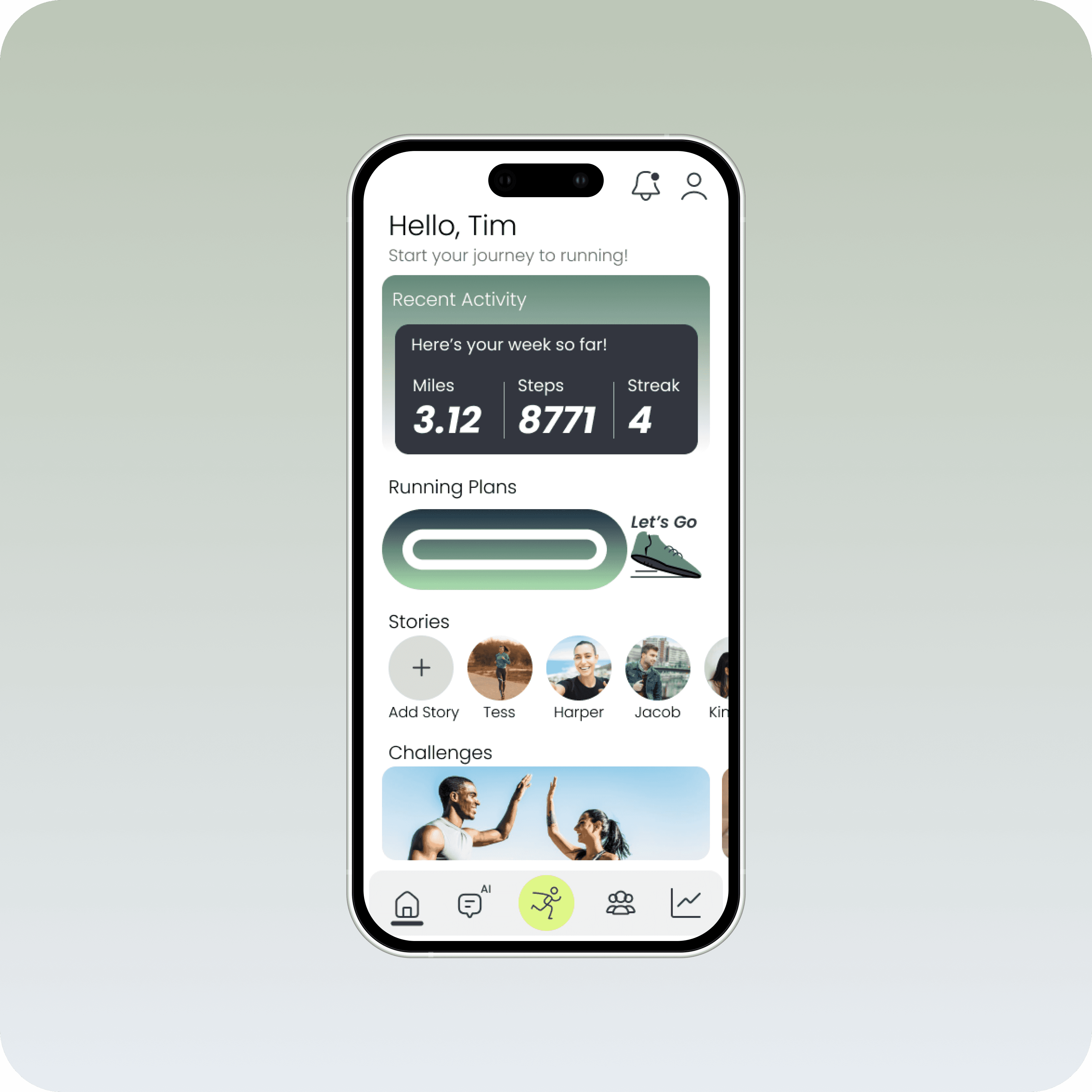
Upmile is a platform that integrates AI coaching and adaptive training plans to help runners stay motivated and adhere to their long-term progress goals.

Ireland Mak
Product Designer
My Role
As the lead UI/UX Designer on Upmile, I drove the vision for a beginner-friendly running app that lowers the barrier to entry for new runners. I led the full design process from foundational research and competitive analysis to information architecture, interaction design, and high-fidelity prototyping.
With my background in healthcare, I brought a strong lens of empathy and accessibility, ensuring the experience felt supportive rather than intimidating. I translated user insights into clear design decisions, facilitated usability testing, and refined the product to create an experience that helps users build healthy routines with confidence.
Challenges
As someone who’s worked in healthcare and spoken with patients about lifestyle changes, I’ve seen firsthand how intimidating it can be for people to begin a new fitness habit, especially running. Personally, I’ve also experienced how challenging it is to stay motivated without a clear plan, encouragement, or understanding of what’s “normal” when starting from scratch.
Most beginner runners turn to apps for help, but many existing solutions are tailored toward experienced users or those already in shape. The tone is often data-heavy, the plans rigid, and the advice too generic. This creates confusion at the very first step before users even start.
Research
Competitive Analysis
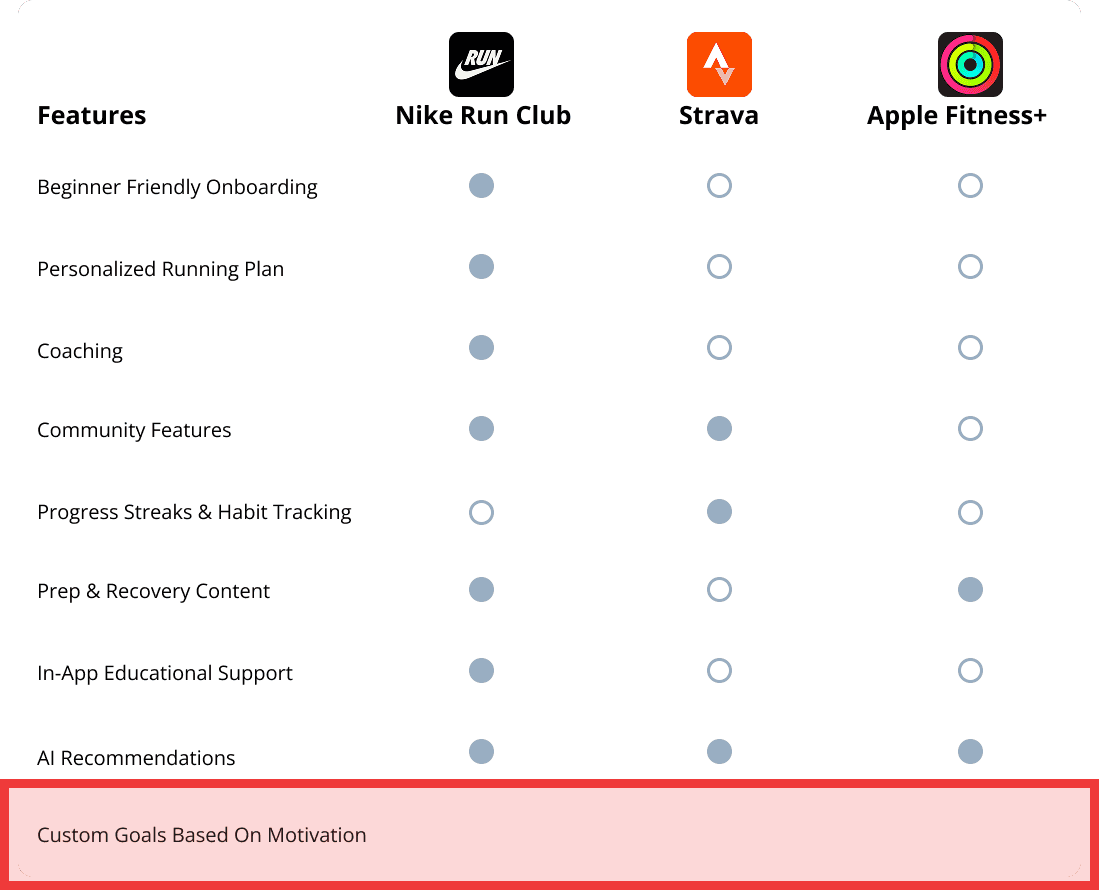
To further inform my direction, I studied leading industry apps to identify what they do well and where they fall short. This helped me define a solution that maintains their strengths while addressing gaps in accessibility, motivation, and beginner support.
Design Strategy
What became clear through competitor analysis and testing was this: most apps assume users already run. They highlight stats, social feeds, and leaderboards. However, they miss the before, the uncertainty, the prep, and the questions no one wants to ask. That’s where most beginners hesitate and where I decided to focus.
Step-by-Step Plan Builder
Breaking down plan creation into clear, manageable stages based on fitness level, schedule, and personal goals.
Beginner Gear + Prep Hub
Providing short, visual resources that explain essential gear, stretches, and safety tips.
Micro-Feedback + Emotional Wins
Encouraging users with milestone messages, progress reflections, and visible celebrations of small victories.
Real-Time Confirmation
Letting users preview and update their plan dynamically to feel more in control of their journey.
Conversational AI Support
Giving users 24/7 help with an intelligent AI coach and accessible, personalized guidance.
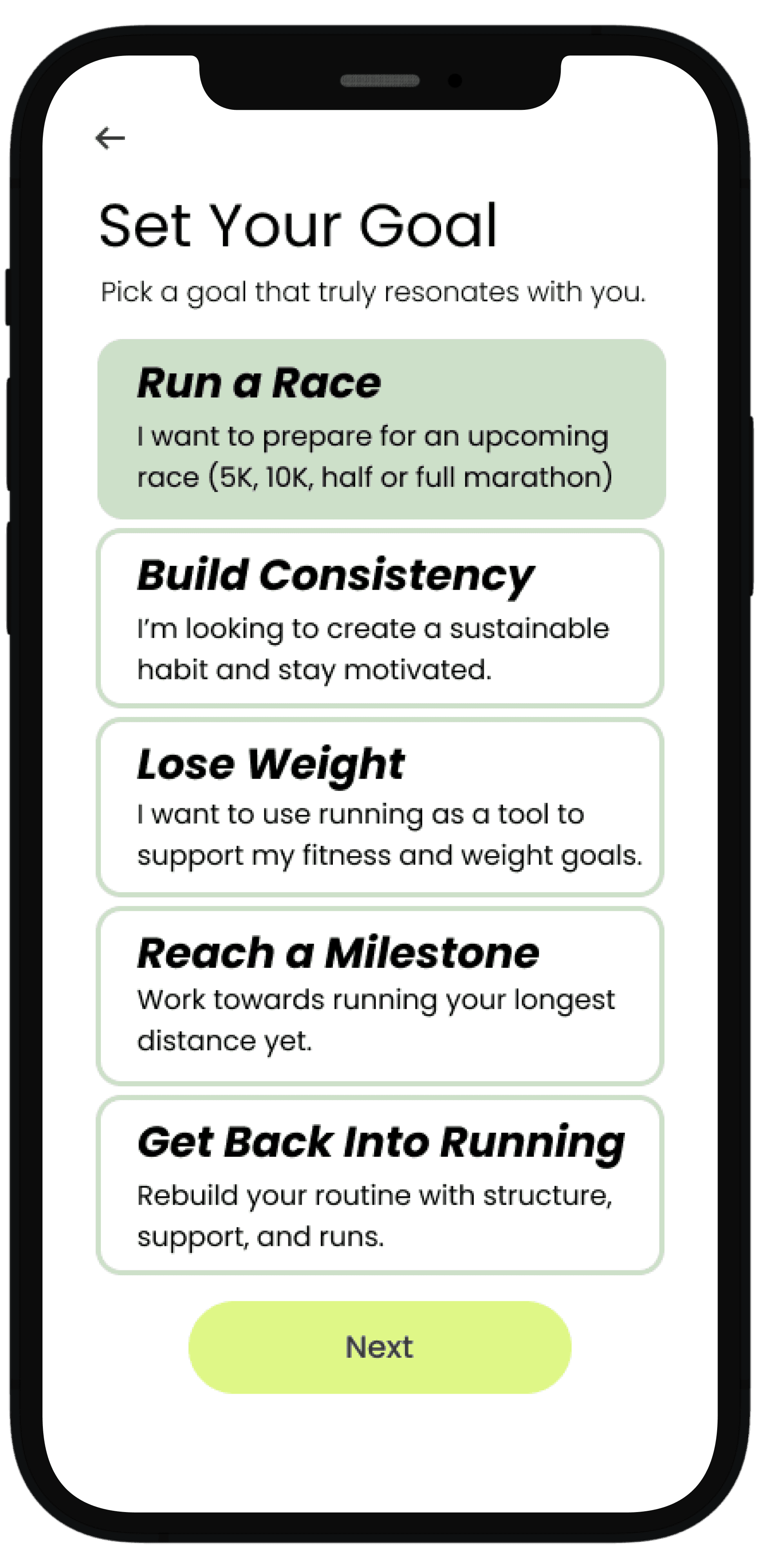
Personalization Through Technology
New runners don’t just need a training plan, they need one that adapts to their fitness level, schedule, and personal goals. Personalized features help reduce uncertainty and make the journey feel achievable.
Step-by-step plan builders, responsive feedback, and visual progress summaries create a sense of clarity and ownership. Users can move at their own pace while still feeling guided and supported.
Runners are 76% more likely to maintain a habit when following a structured, personalized plan.
*According to Strava - Strava Year In Sport Trend Report: Insights on the World of Exercise
Building Confidence with the Right Information
Confidence starts with preparation. Many users drop off due to lack of knowledge around gear, warm-ups, or injury prevention.
Curated prep and recovery sections address these pain points by offering beginner-friendly videos, checklists, and quick tips.
When users feel physically and mentally ready, they’re more likely to stick with their plan and avoid burnout or injury. Giving them the right tools at the right time to make the process feel more approachable.
*According to Strava - Strava Year In Sport Trend Report: Insights on the World of Exercise


Motivation That Goes Beyond Metrics
Progress isn’t just measured in pace or distance. For beginners, emotional motivation matters just as much, if not more than data.
Features like milestone badges, reflection prompts, and encouraging language help reinforce effort and build momentum.
Adding human-like AI support, journal prompts, and subtle celebrations gives users the feeling that their work is seen, valued, and worth continuing.
*Supporting Physical Activity Behavior Change with LLM-Based Conversational Agents
Early Ideation
In the early stages of ideation, I explored how a running app could go beyond basic tracking to truly support beginners. I focused on creating a guided experience: one that would offer education on gear, training plans tailored to different goals, and features that address the emotional and motivational challenges new runners face. These early concepts aimed to make running feel approachable, personal, and sustainable.
User Flow
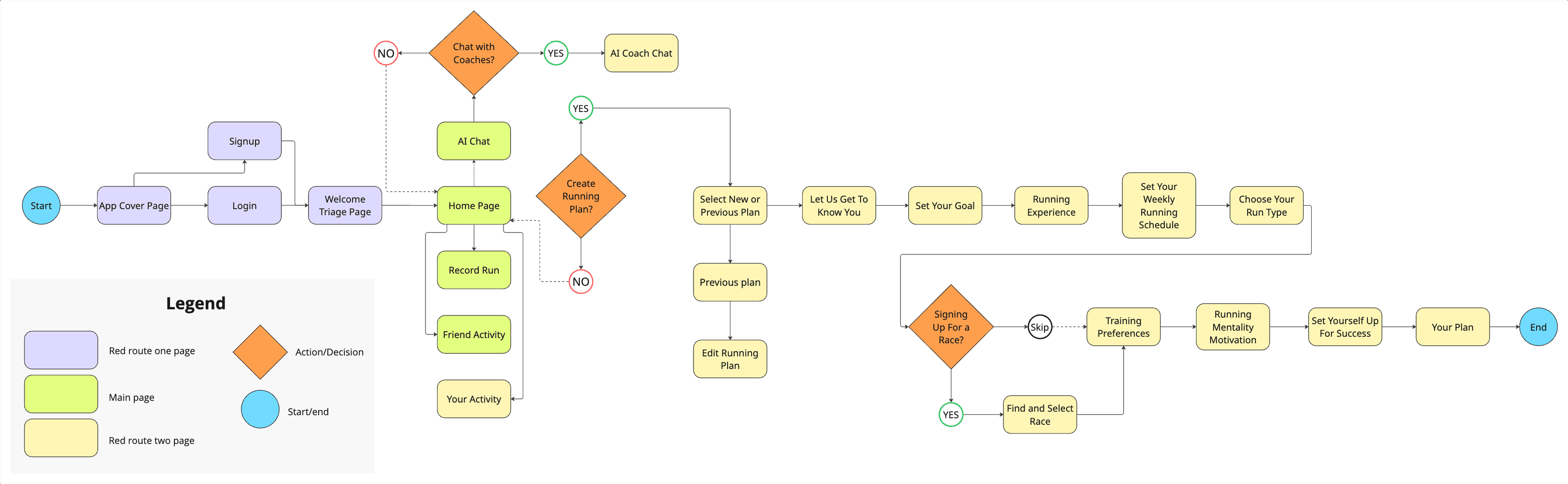
I designed three flexible entry points to reflect how different users approach running.
The first supports true beginners who want to start from scratch. It guides them through key decisions like goals, schedule, and experience level to generate a personalized, step-by-step training plan.
The second is for returning users who may have fallen out of routine. Instead of restarting, they can quickly resume or adjust an existing plan based on their current pace or availability, reducing friction and supporting long-term consistency.
The third introduces a conversational AI assistant for moments of uncertainty. Whether users need help choosing a plan, understanding gear, or asking quick questions, this lightweight path provides just-in-time guidance without overwhelming them.
Overall, these three paths ensure the app is inclusive of different runner mindsets, whether they're starting fresh, returning, or exploring options, and set the tone for a supportive and user-centered experience.
Wireframing and Guerilla Testing
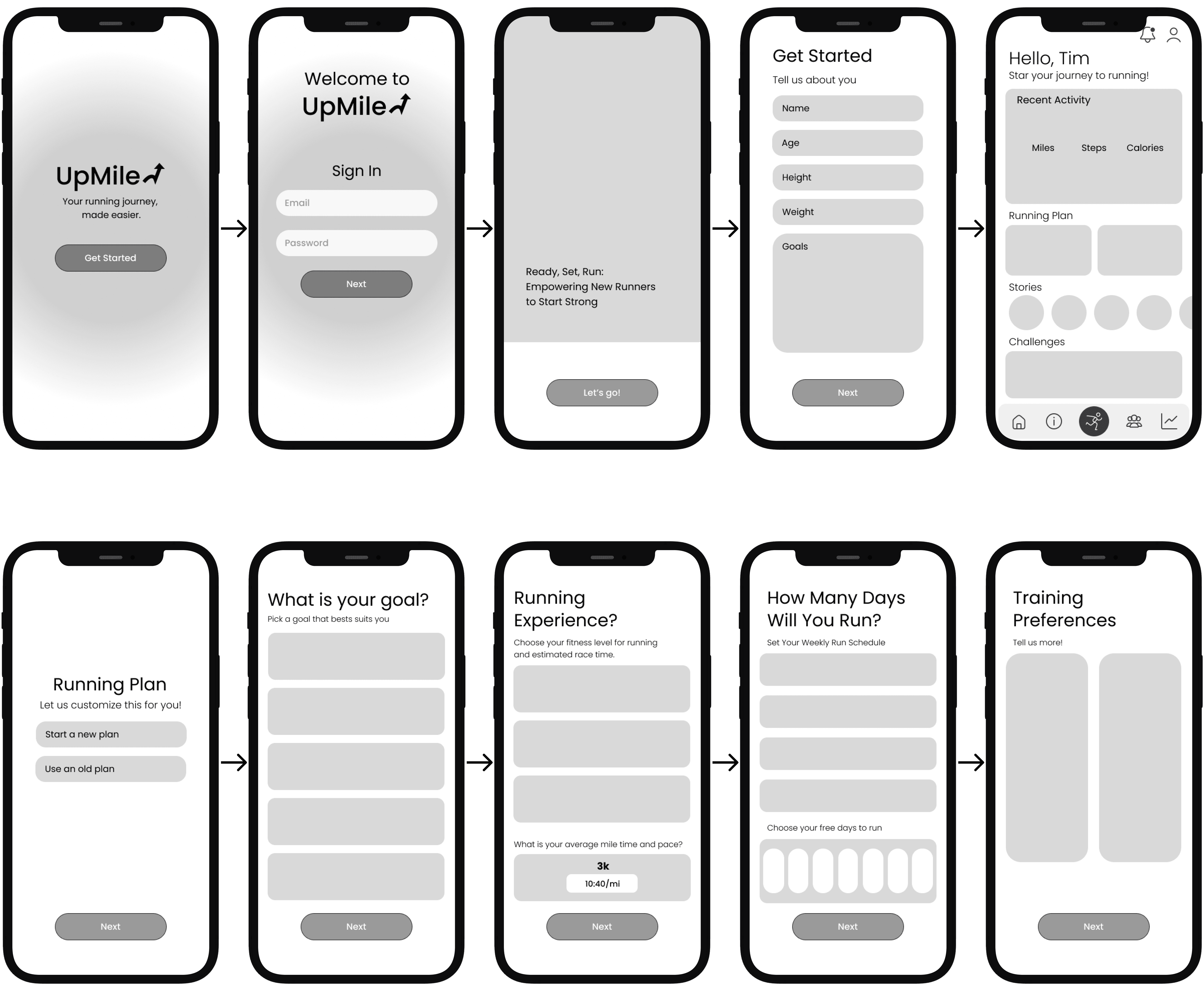
By tailoring the app’s features to individual preferences and needs, I aimed to make each runner feel supported and equipped to reach their goals, whether they’re beginners or more experienced.
This approach guided the layout and flow, ensuring simplicity while maintaining helpful guidance throughout the user journey.
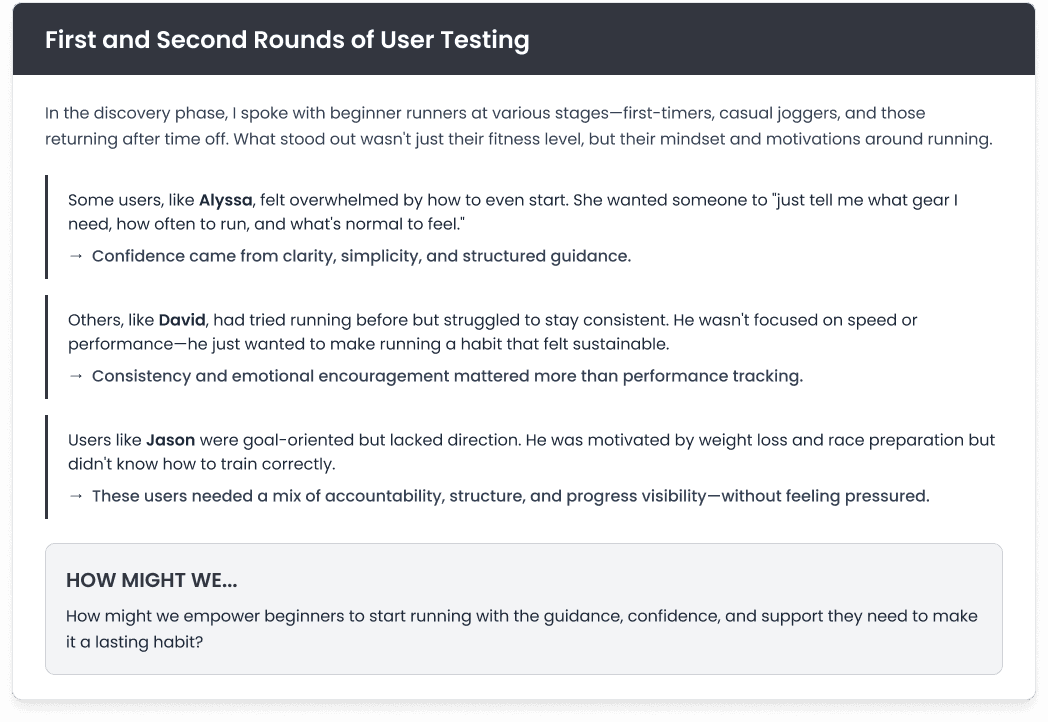
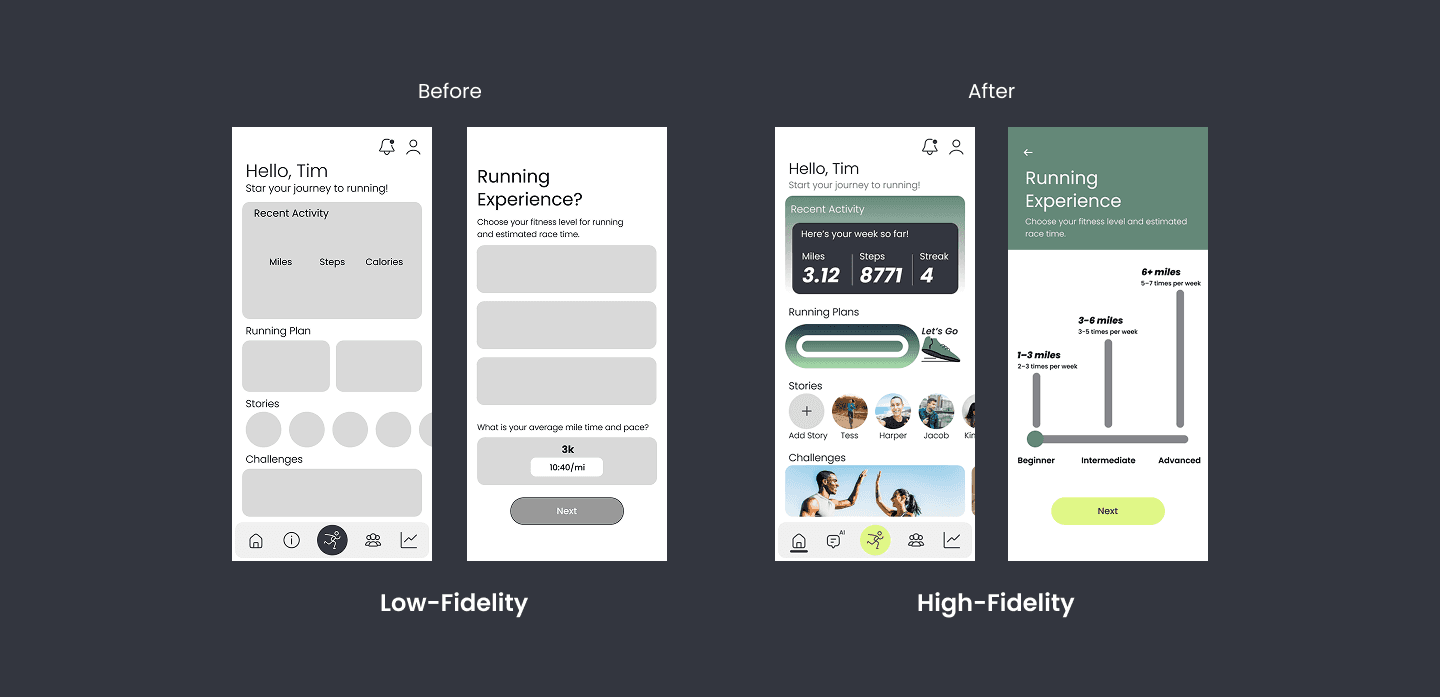
User Pain Points
From Information Overload to Intentional Navigation
During initial usability testing, a major pain point became clear: users felt overwhelmed by the sheer amount of content packed into a single scroll-heavy page.
“I kept scrolling but wasn’t sure what was important or how far I had left to go.”
“There’s just so much on one page and I didn’t know where to start.”
While the information itself was helpful, the presentation made it hard to digest, especially for beginners. Testers reported feeling lost, disengaged, and unsure of what to focus on.
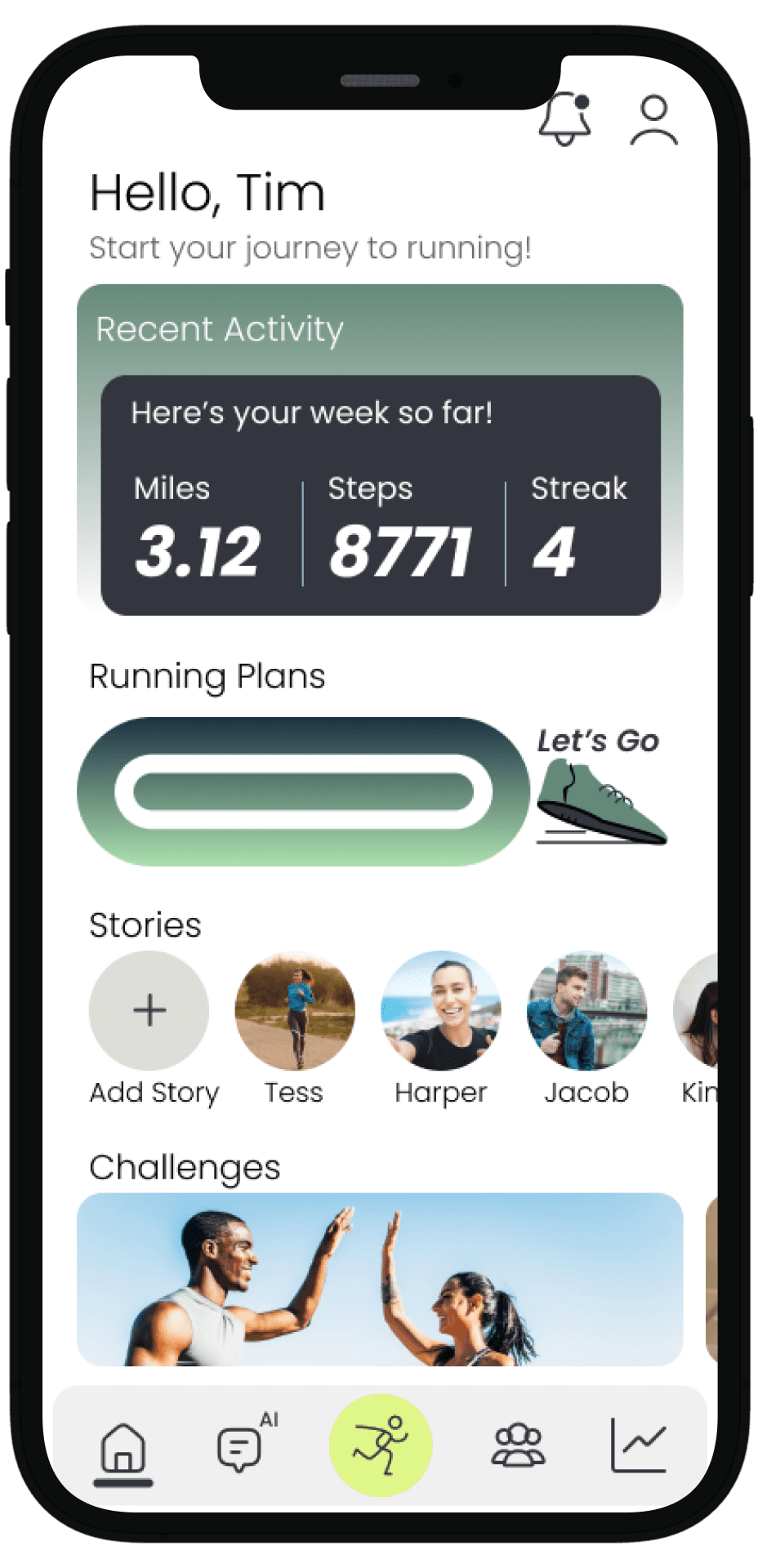
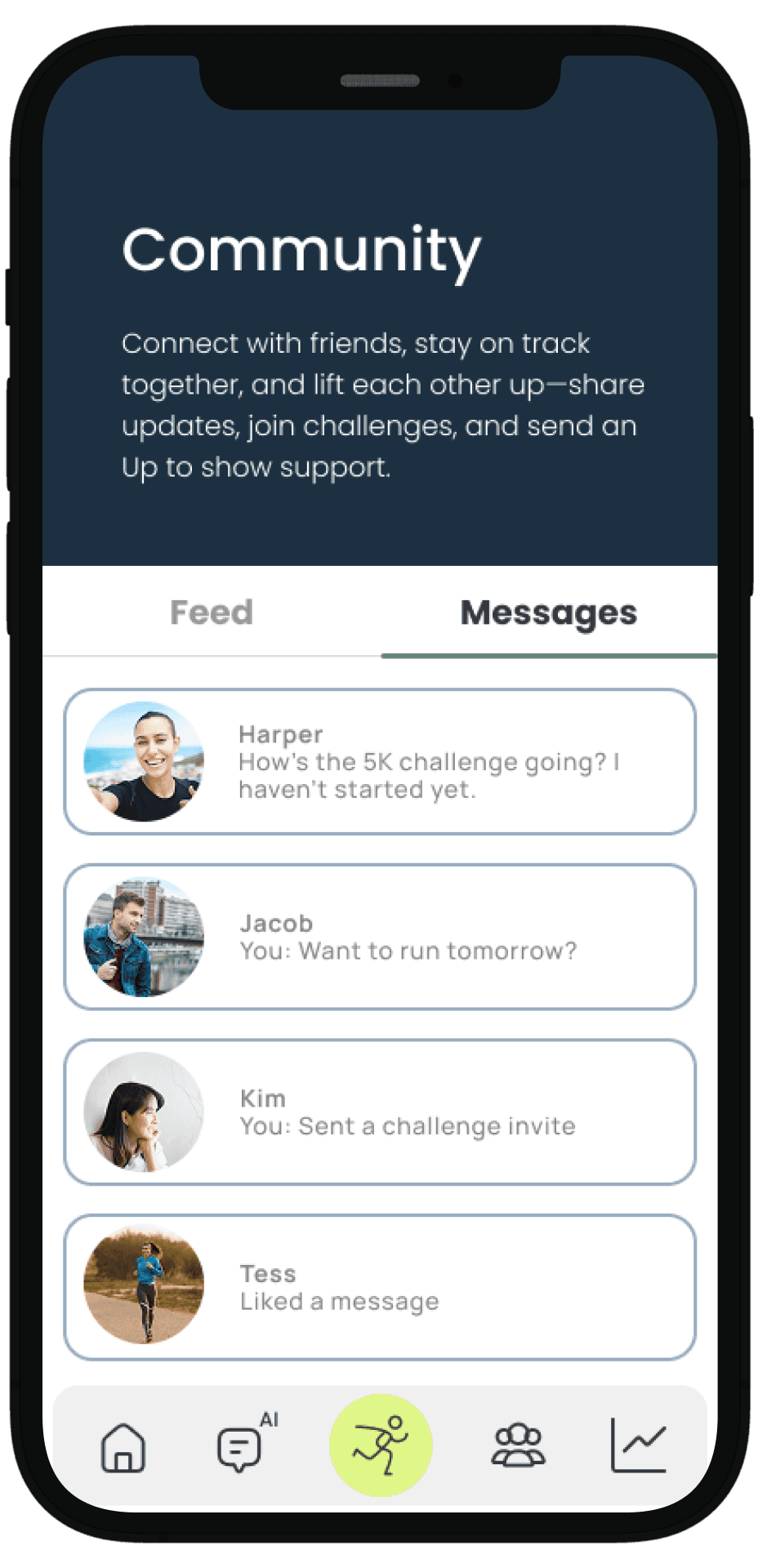
Real-Time Stories: Building Connection and Urgency
User interviews revealed that sharing progress through stories is one of the most effective ways to maintain motivation and accountability.
Stories create a real-time connection among users, creating a sense of urgency to check the app frequently and stay updated on others’ activities.
This dynamic encourages ongoing interaction and builds a supportive community environment.
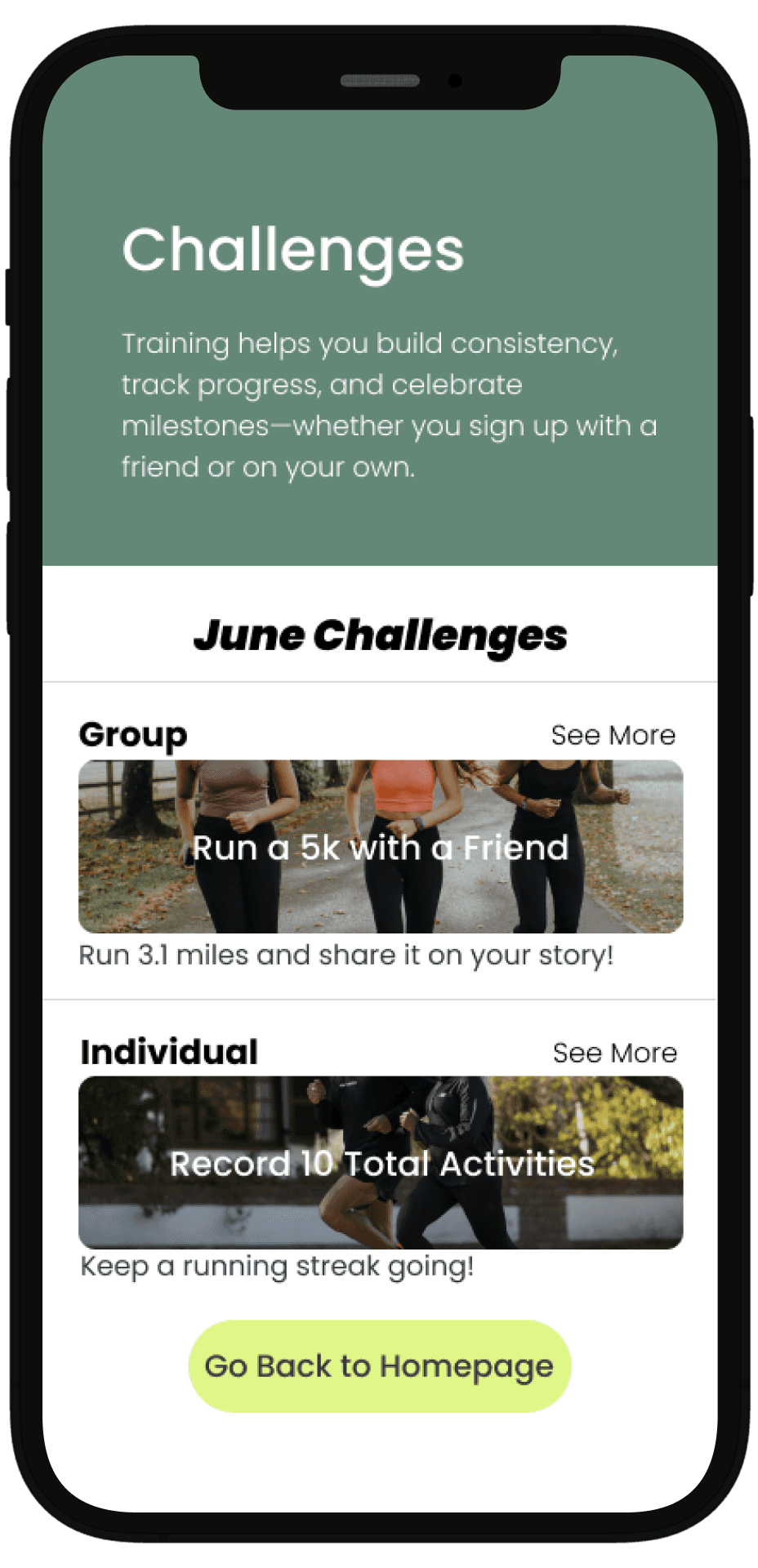
Challenges: Driving Motivation Through Social Incentives
Community challenges provide users with clear goals and friendly competition, which boost motivation and accountability.
By offering rewards and recognition, these challenges encourage users to stay active and committed. This modified approach strengthens social bonds and keeps the app experience fresh and engaging.
Introduced a Hamburger Menu for Simple Navigation
I implemented a hamburger menu to break up content into clear sections (Warm-Up & Recovery, Gear Guide, Mindset & Motivation) This gave users control and made jumping between topics fast and intuitive.
Structured Content Into Digestible, Themed Categories
Instead of general information all at once, each category helps guide users through one key part of their running journey.
Designed Each Page With Focus and Clarity
I used consistent headers, short descriptions, and visual support such as photos, icons, videos to make the content feel easy to absorb.
Users could now scan, understand, and apply tips without getting lost or overwhelmed.

High Fidelity Screens
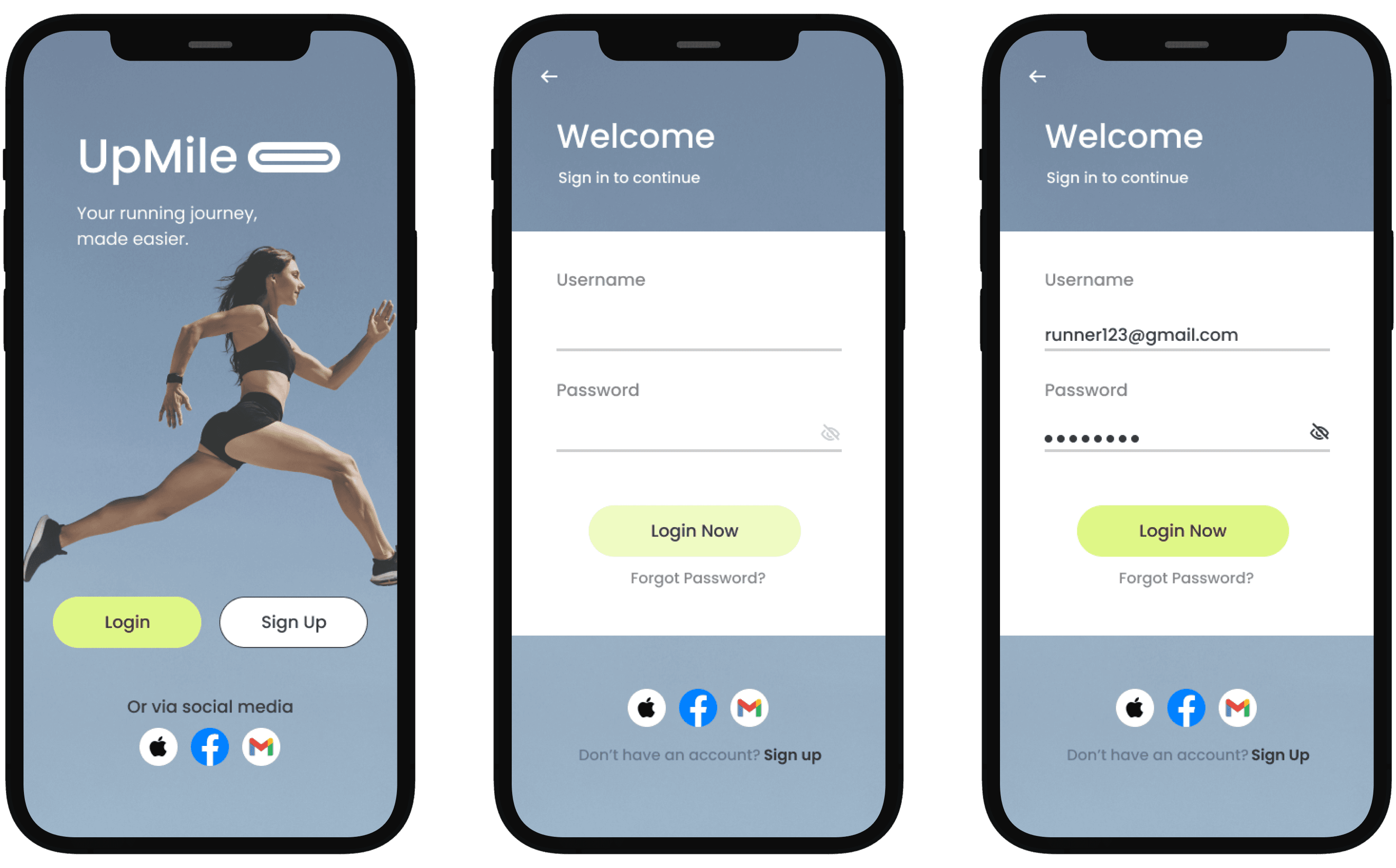
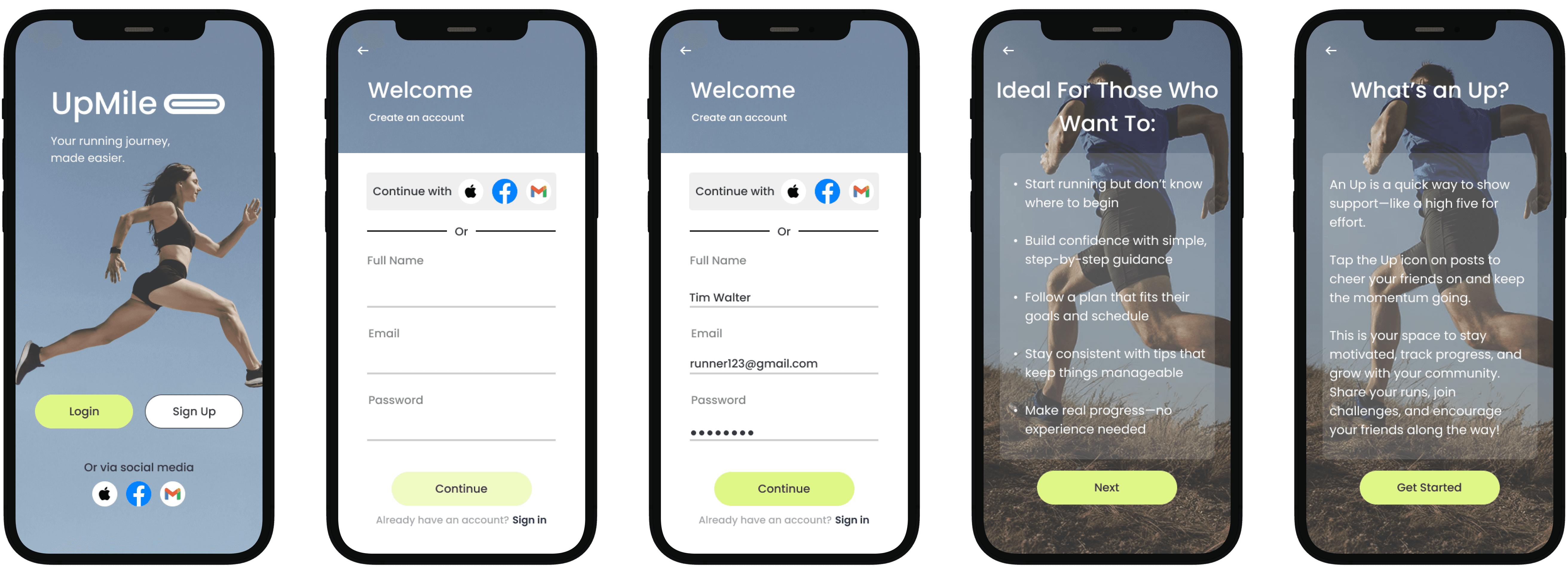
Sign In and Sign Up
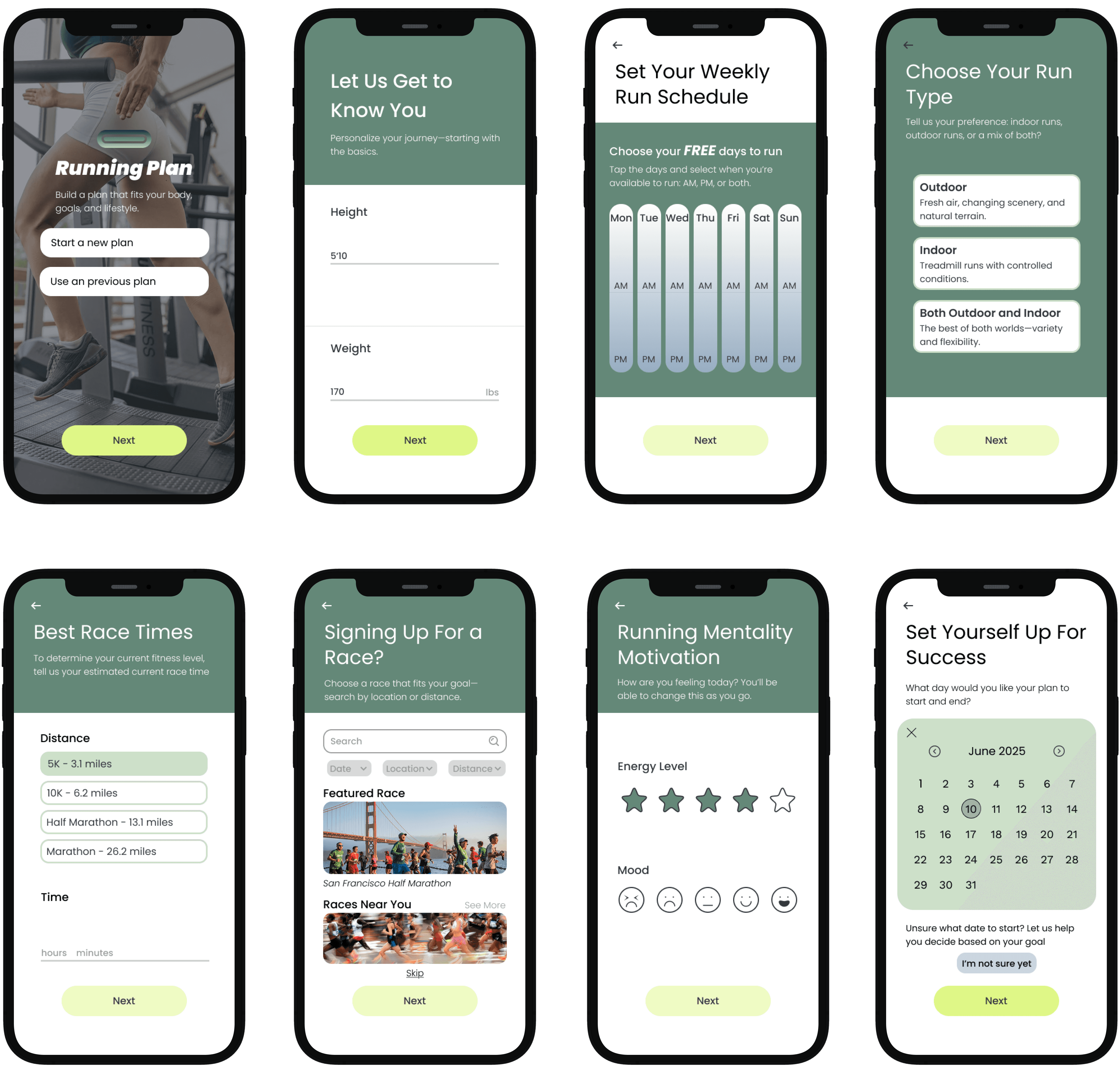
Red Route One - Create Running Plan
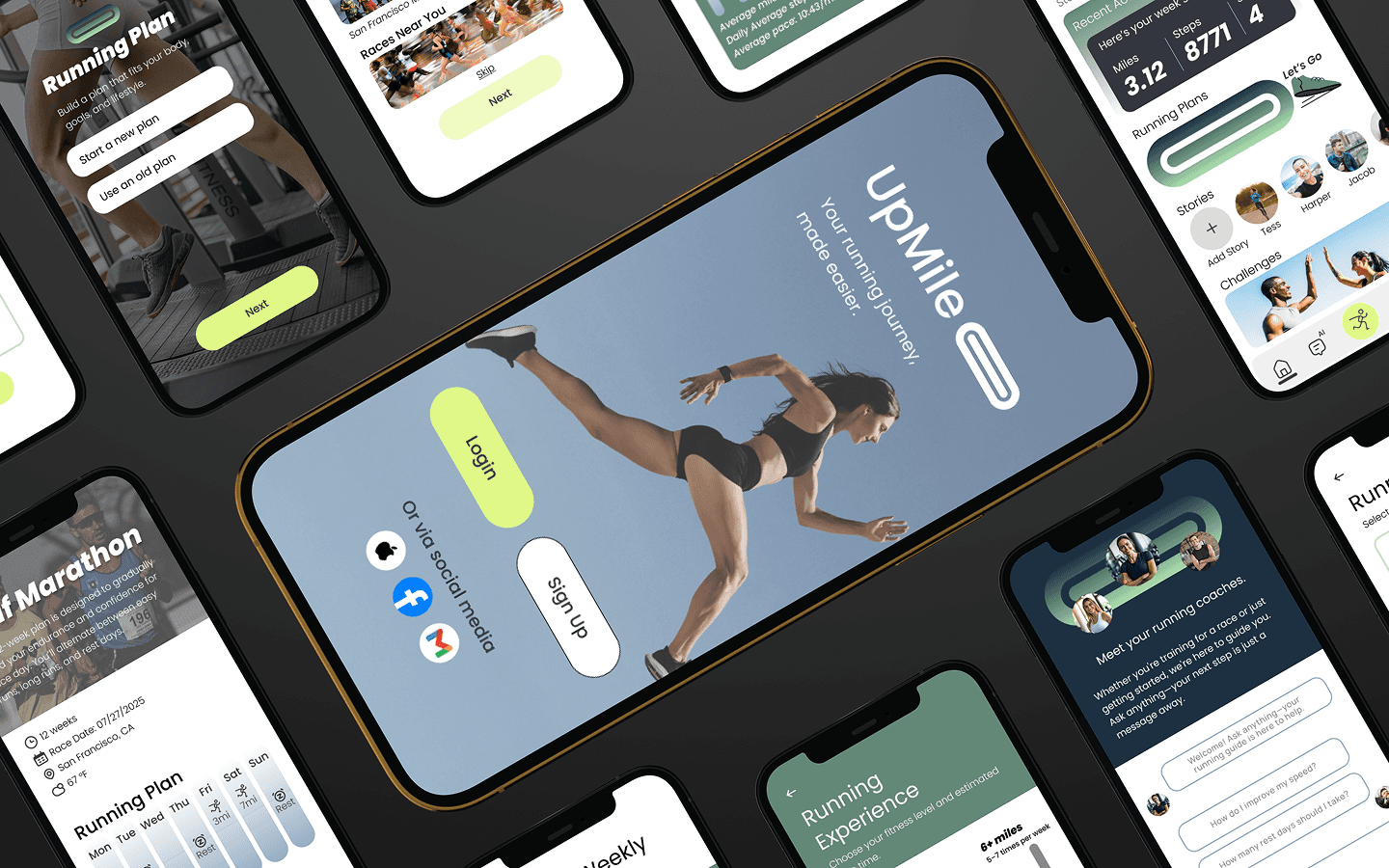
These result pages offer a clean, personalized experience aligned with each user's goals, schedule, and fitness level. Core details like weekly mileage, progress tracking, and run types are clearly displayed to keep users focused and motivated.
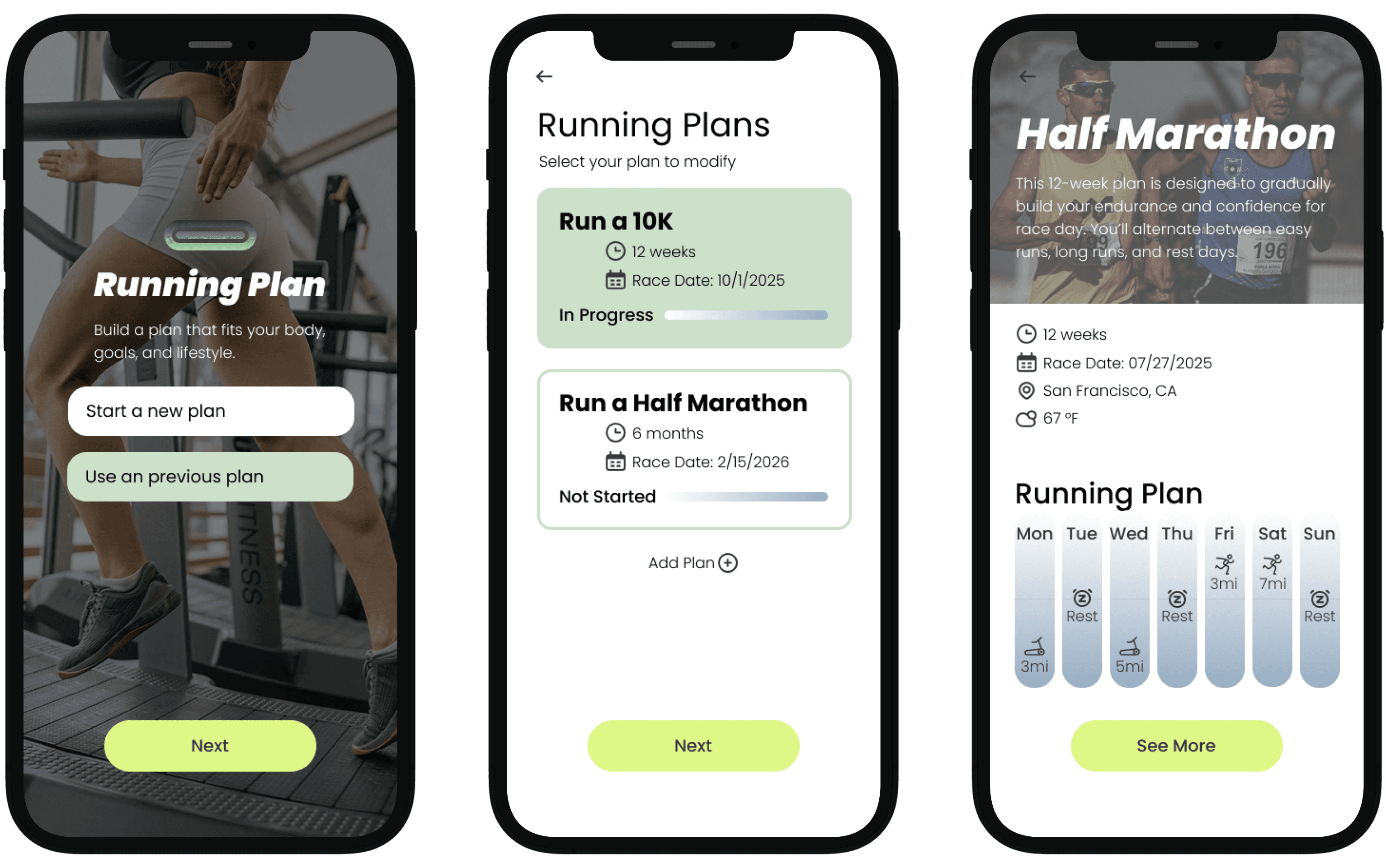
Red Route Two - Use Previous Running Plan
Editing supports real-life flexibility: users can adjust specific runs, change weekly targets, or update their timeline. The interface is modular and intuitive, making edits feel manageable without starting over. This route encourages consistency and long-term engagement, even when routines shift.
Red Route Three - AI Chat
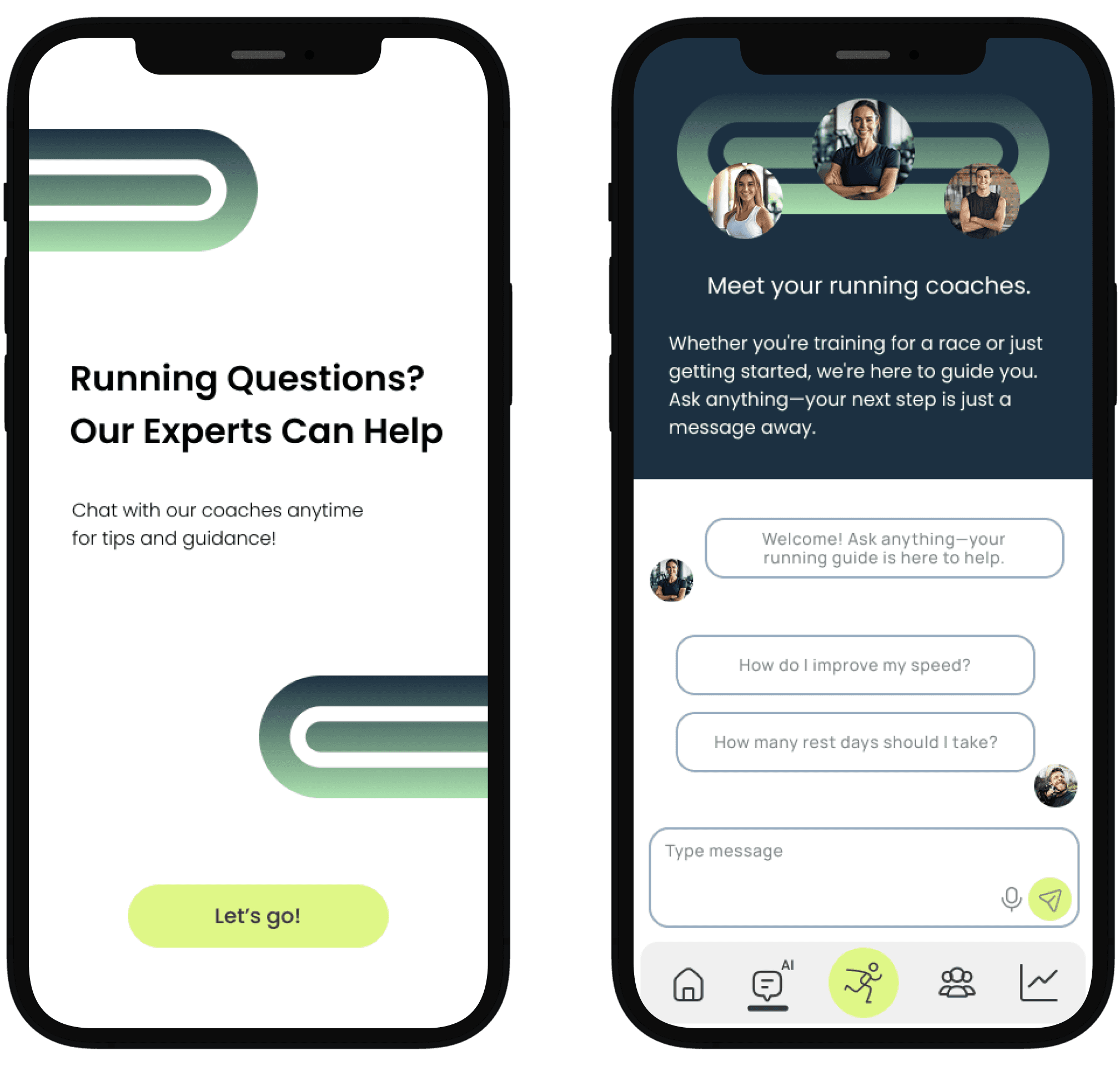
The AI chat feature acts as an on-demand running coach, offering guidance, answering questions, and suggesting adjustments based on user activity. It was designed to feel approachable and responsive, giving users a sense of real-time support.
Design System
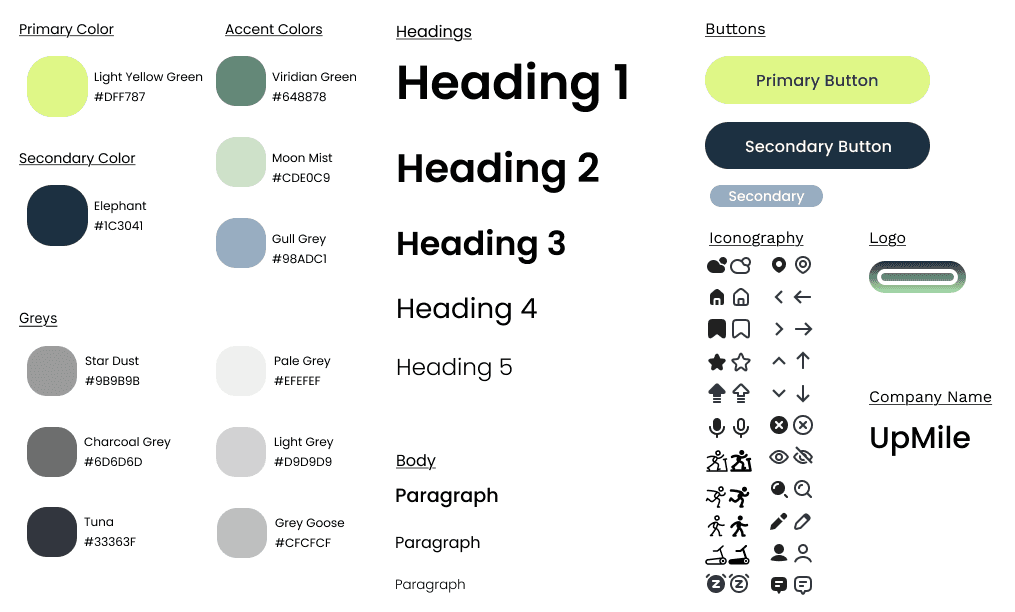
I chose a green color palette for the app because it naturally evokes feelings of growth, energy, and balance, which are qualities that align well with running and fitness.
Green is often associated with nature and the outdoors, which complements the app’s focus on both indoor and outdoor running options. From a psychological perspective, green promotes calmness and motivation without overwhelming the user, helping maintain focus during training.
*According to Cleveland Clinic Newsroom - Why Many Enjoy the Color Green
The Impact: Bridging the Confidence Gap
Through iterative testing and an empathy lens, I transformed Upmile from a tracking utility into a comprehensive support system. By focusing on the psychological barriers to entry, I solved three core pain points:
From Data-Shaming to Micro-Wins:
I replaced performance-heavy metrics with psychological reinforcement. Celebrating "micro-milestones" (like completing a warm-up) shifted the focus from distance to habit formation.
Reducing Cognitive Overload:
I restructured the information architecture into a modular navigation system. By categorizing gear and prep into "just-in-time" modules, users felt prepared without feeling overwhelmed.
The "Coach" Experience:
I evolved a standard chatbot into an Empathy-Driven AI Assistant. By utilizing contextual prompts based on user progress, the app moved from a "tool" to a "partner," increasing user confidence during onboarding.
Future Scoping & Strategy
To further evolve Upmile, my next steps would focus on the long-term emotional journey of a runner:
→
Emotional Mapping: I would map the specific "drop-off points" (e.g., the 3-week slump) to align motivational messaging and pacing even more precisely with the user's headspace.
→
Non-Competitive Community: I'd explore small-group accountability tools that prioritize shared goals over leaderboards, catering to the beginner's need for safety rather than competition.
More insights to explore
Discover additional case studies, tips, and strategies to help your business grow and innovate faster.

2025
Huey Suncare: Redesigning the Suncare E-commerce Experience
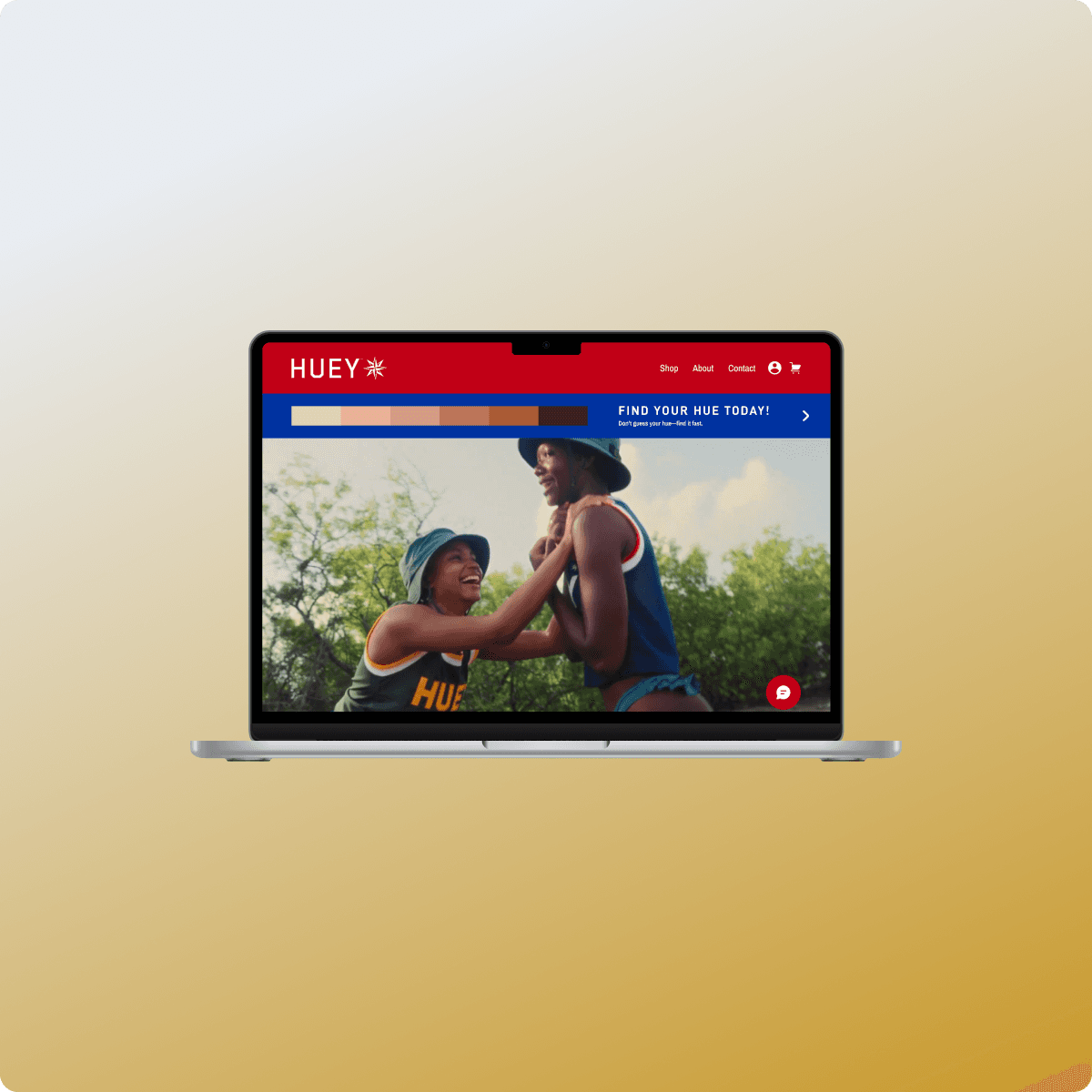
A modernized e-commerce platform that integrates interactive quizzes and an AI-powered dermatology chat to improve accessibility for diverse skin needs.
2024
Nomie: Where Personalized Travel Style Meets Financial Clarity
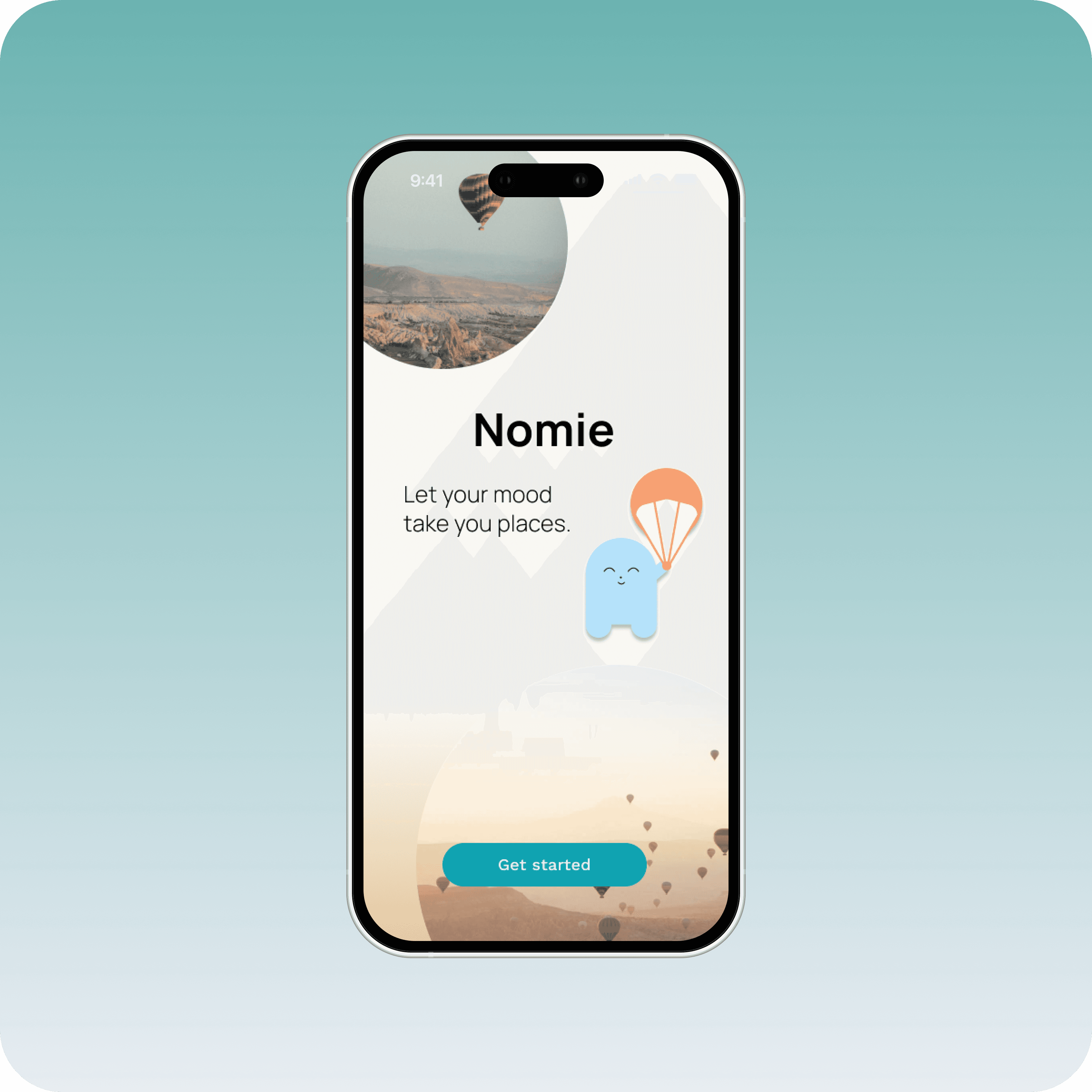
Nomie is an AI-powered budgeting tool that translates individual spending habits into personalized itineraries to help travelers plan actionable and stress-free trips.
2025
2025
Upmile: Scaling Personal Running Performance with AI Coaching
Upmile is a platform that integrates AI coaching and adaptive training plans to help runners stay motivated and adhere to their long-term progress goals.
Ireland Mak
Product Designer
My Role
As the lead UI/UX Designer on Upmile, I drove the vision for a beginner-friendly running app that lowers the barrier to entry for new runners. I led the full design process from foundational research and competitive analysis to information architecture, interaction design, and high-fidelity prototyping.
With my background in healthcare, I brought a strong lens of empathy and accessibility, ensuring the experience felt supportive rather than intimidating. I translated user insights into clear design decisions, facilitated usability testing, and refined the product to create an experience that helps users build healthy routines with confidence.
Challenges
As someone who’s worked in healthcare and spoken with patients about lifestyle changes, I’ve seen firsthand how intimidating it can be for people to begin a new fitness habit, especially running. Personally, I’ve also experienced how challenging it is to stay motivated without a clear plan, encouragement, or understanding of what’s “normal” when starting from scratch.
Most beginner runners turn to apps for help, but many existing solutions are tailored toward experienced users or those already in shape. The tone is often data-heavy, the plans rigid, and the advice too generic. This creates confusion at the very first step before users even start.
Challenges
As someone who’s worked in healthcare and spoken with patients about lifestyle changes, I’ve seen firsthand how intimidating it can be for people to begin a new fitness habit, especially running. Personally, I’ve also experienced how challenging it is to stay motivated without a clear plan, encouragement, or understanding of what’s “normal” when starting from scratch.
Most beginner runners turn to apps for help, but many existing solutions are tailored toward experienced users or those already in shape. The tone is often data-heavy, the plans rigid, and the advice too generic. This creates confusion at the very first step before users even start.
Research
Competitive Analysis
To further inform my direction, I studied leading industry apps to identify what they do well and where they fall short. This helped me define a solution that maintains their strengths while addressing gaps in accessibility, motivation, and beginner support.
Design Strategy
What became clear through competitor analysis and testing was this: most apps assume users already run. They highlight stats, social feeds, and leaderboards. However, they miss the before, the uncertainty, the prep, and the questions no one wants to ask. That’s where most beginners hesitate and where I decided to focus.
Research - Competitive Analysis
To further inform my direction, I studied leading industry apps to identify what they do well and where they fall short. This helped me define a solution that maintains their strengths while addressing gaps in accessibility, motivation, and beginner support.
Solutions
Support and Structure Drive Consistency
Building Confidence with the Right Information
Confidence starts with preparation. Many users drop off due to lack of knowledge around gear, warm-ups, or injury prevention.
Curated prep and recovery sections address these pain points by offering beginner-friendly videos, checklists, and quick tips.
When users feel physically and mentally ready, they’re more likely to stick with their plan and avoid burnout or injury. Giving them the right tools at the right time to make the process feel more approachable.
*According to Strava - Strava Year In Sport Trend Report: Insights on the World of Exercise
Motivation That Goes Beyond Metrics
Progress isn’t just measured in pace or distance. For beginners, emotional motivation matters just as much, if not more than data.
Features like milestone badges, reflection prompts, and encouraging language help reinforce effort and build momentum.
Adding human-like AI support, journal prompts, and subtle celebrations gives users the feeling that their work is seen, valued, and worth continuing.
*Supporting Physical Activity Behavior Change with LLM-Based Conversational Agents
Early Ideation
In the early stages of ideation, I explored how a running app could go beyond basic tracking to truly support beginners. I focused on creating a guided experience: one that would offer education on gear, training plans tailored to different goals, and features that address the emotional and motivational challenges new runners face. These early concepts aimed to make running feel approachable, personal, and sustainable.
User Flow
I designed three flexible entry points to reflect how different users approach running.
The first supports true beginners who want to start from scratch. It guides them through key decisions like goals, schedule, and experience level to generate a personalized, step-by-step training plan.
The second is for returning users who may have fallen out of routine. Instead of restarting, they can quickly resume or adjust an existing plan based on their current pace or availability, reducing friction and supporting long-term consistency.
The third introduces a conversational AI assistant for moments of uncertainty. Whether users need help choosing a plan, understanding gear, or asking quick questions, this lightweight path provides just-in-time guidance without overwhelming them.
Overall, these three paths ensure the app is inclusive of different runner mindsets, whether they're starting fresh, returning, or exploring options, and set the tone for a supportive and user-centered experience.
Design Strategy
Wireframing and Guerilla Testing
By tailoring the app’s features to individual preferences and needs, I aimed to make each runner feel supported and equipped to reach their goals, whether they’re beginners or more experienced. This approach guided the layout and flow, ensuring simplicity while maintaining helpful guidance throughout the user journey.
User Interviews
Solution
Support and Structure Drive Consistency
Real-Time Stories: Building Connection and Urgency
User interviews revealed that sharing progress through stories is one of the most effective ways to maintain motivation and accountability.
Stories create a real-time connection among users, creating a sense of urgency to check the app frequently and stay updated on others’ activities.
This dynamic encourages ongoing interaction and builds a supportive community environment.
Challenges: Driving Motivation Through Social Incentives
Community challenges provide users with clear goals and friendly competition, which boost motivation and accountability.
By offering rewards and recognition, these challenges encourage users to stay active and committed. This modified approach strengthens social bonds and keeps the app experience fresh and engaging.
Design System
I chose a green color palette for the app because it naturally evokes feelings of growth, energy, and balance, which are qualities that align well with running and fitness.
Green is often associated with nature and the outdoors, which complements the app’s focus on both indoor and outdoor running options. From a psychological perspective, green promotes calmness and motivation without overwhelming the user, helping maintain focus during training.
*According to Cleveland Clinic Newsroom - Why Many Enjoy the Color Green
Test It Out!
Competitive Analysis
EduSeek AI bridges the gap between passive learning and real-time support through integrated live tutoring, AI guidance, and personalized learning in one space.
Instead of treating learning as a one-directional experience, it combines three things that are usually separate: live student support, AI tutoring, and personalized learning paths. So if a student gets stuck, they’re not forced to leave the platform or wait—they can immediately get help, either through AI or a real tutor.
Competitive Analysis
EduSeek AI bridges the gap between passive learning and real-time support through integrated live tutoring, AI guidance, and personalized learning in one space.
Instead of treating learning as a one-directional experience, it combines three things that are usually separate: live student support, AI tutoring, and personalized learning paths. So if a student gets stuck, they’re not forced to leave the platform or wait—they can immediately get help, either through AI or a real tutor.
Research
Competitive Analysis
To further inform my direction, I studied leading industry apps to identify what they do well and where they fall short. This helped me define a solution that maintains their strengths while addressing gaps in accessibility, motivation, and beginner support.
User Quote
What I appreciate about EduSeek AI is that it helps me meet students where they are. I can quickly see what they’re struggling with, so we can focus on building real understanding instead of just getting through problems. I’ve noticed my students feel more confident, which is always my goal as a teacher.
What I appreciate about EduSeek AI is that it helps me meet students where they are. I can quickly see what they’re struggling with, so we can focus on building real understanding instead of just getting through problems. I’ve noticed my students feel more confident, which is always my goal as a teacher.

Hatice Algebra I & II Tutor
User Personas
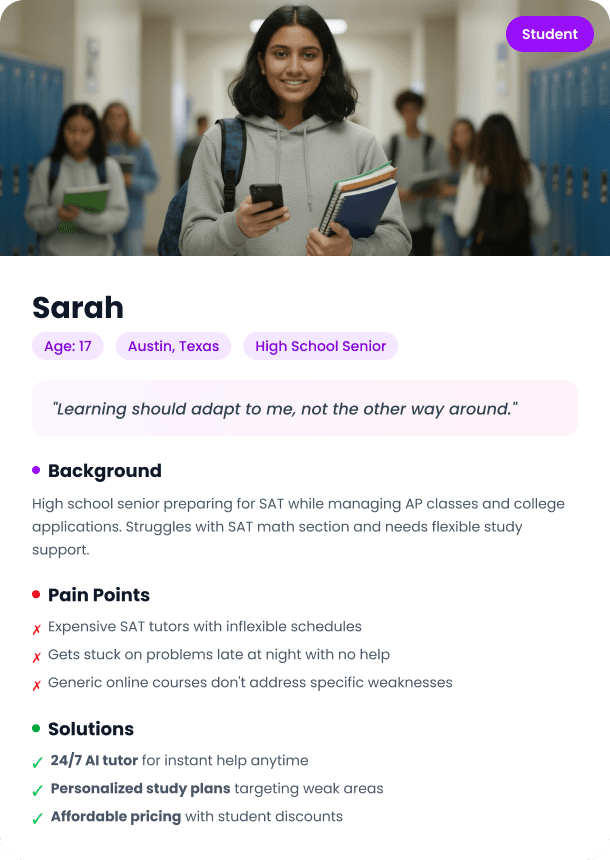
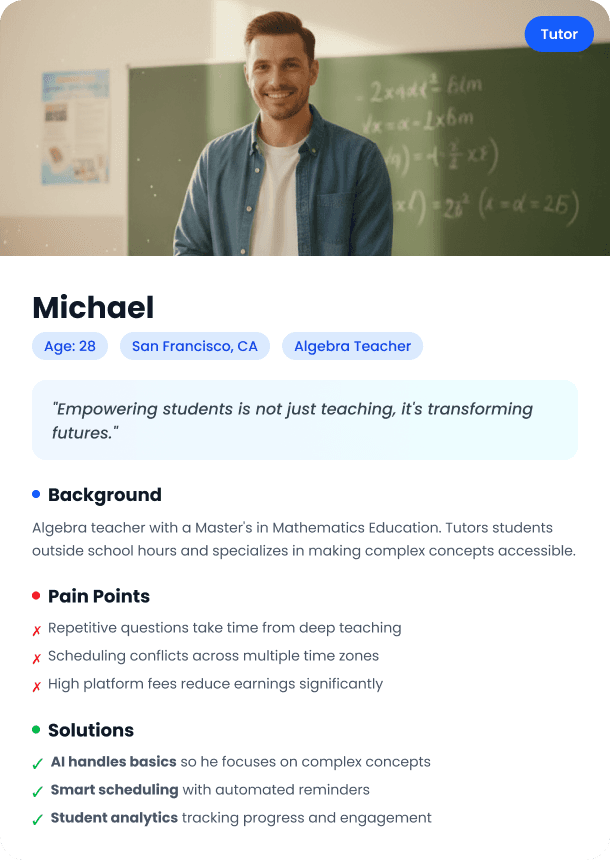
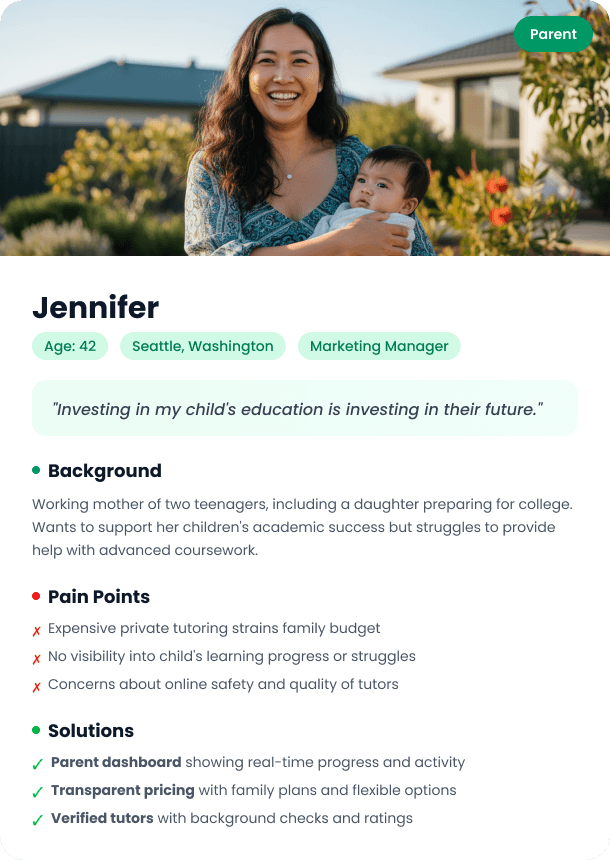
First is the student, someone balancing school, time, and often needing flexible, on-demand support. Their biggest challenge is getting help that’s actually personalized and available when they need it.
Second is the tutor. They’re not just teaching, but also managing scheduling, sessions, and income. So their experience needs to be efficient, responsive, and easy to manage.
And third is the parent, who’s looking for visibility and trust. They want to understand their child’s progress and feel confident in the support they’re receiving.
Design Strategy
What became clear through competitor analysis and testing was this: most apps assume users already run. They highlight stats, social feeds, and leaderboards. However, they miss the before, the uncertainty, the prep, and the questions no one wants to ask. That’s where most beginners hesitate and where I decided to focus.
Step-by-Step Plan Builder
Breaking down plan creation into clear, manageable stages based on fitness level, schedule, and personal goals.
Beginner Gear + Prep Hub
Providing short, visual resources that explain essential gear, stretches, and safety tips.
Micro-Feedback + Emotional Wins
Encouraging users with milestone messages, progress reflections, and visible celebrations of small victories.
Real-Time Confirmation
Letting users preview and update their plan dynamically to feel more in control of their journey.
Conversational AI Support
Giving users 24/7 help with an intelligent AI coach and accessible, personalized guidance.
Personalization Through Technology
New runners don’t just need a training plan, they need one that adapts to their fitness level, schedule, and personal goals. Personalized features help reduce uncertainty and make the journey feel achievable.
Step-by-step plan builders, responsive feedback, and visual progress summaries create a sense of clarity and ownership. Users can move at their own pace while still feeling guided and supported.
Runners are 76% more likely to maintain a habit when following a structured, personalized plan.
*According to Strava - Strava Year In Sport Trend Report: Insights on the World of Exercise
Building Confidence with the Right Information
Confidence starts with preparation. Many users drop off due to lack of knowledge around gear, warm-ups, or injury prevention.
Curated prep and recovery sections address these pain points by offering beginner-friendly videos, checklists, and quick tips.
When users feel physically and mentally ready, they’re more likely to stick with their plan and avoid burnout or injury. Giving them the right tools at the right time to make the process feel more approachable.
*According to Strava - Strava Year In Sport Trend Report: Insights on the World of Exercise
Motivation That Goes Beyond Metrics
Progress isn’t just measured in pace or distance. For beginners, emotional motivation matters just as much, if not more than data.
Features like milestone badges, reflection prompts, and encouraging language help reinforce effort and build momentum.
Adding human-like AI support, journal prompts, and subtle celebrations gives users the feeling that their work is seen, valued, and worth continuing.
*Supporting Physical Activity Behavior Change with LLM-Based Conversational Agents
Early Ideation
In the early stages of ideation, I explored how a running app could go beyond basic tracking to truly support beginners. I focused on creating a guided experience: one that would offer education on gear, training plans tailored to different goals, and features that address the emotional and motivational challenges new runners face. These early concepts aimed to make running feel approachable, personal, and sustainable.
User Flow
Early Ideation
In the early stages of ideation, I explored how a running app could go beyond basic tracking to truly support beginners. I focused on creating a guided experience: one that would offer education on gear, training plans tailored to different goals, and features that address the emotional and motivational challenges new runners face. These early concepts aimed to make running feel approachable, personal, and sustainable.
I designed three flexible entry points to reflect how different users approach running.
The first supports true beginners who want to start from scratch. It guides them through key decisions like goals, schedule, and experience level to generate a personalized, step-by-step training plan.
The second is for returning users who may have fallen out of routine. Instead of restarting, they can quickly resume or adjust an existing plan based on their current pace or availability, reducing friction and supporting long-term consistency.
The third introduces a conversational AI assistant for moments of uncertainty. Whether users need help choosing a plan, understanding gear, or asking quick questions, this lightweight path provides just-in-time guidance without overwhelming them.
I designed three flexible entry points to reflect how different users approach running.
The first supports true beginners who want to start from scratch. It guides them through key decisions like goals, schedule, and experience level to generate a personalized, step-by-step training plan.
The second is for returning users who may have fallen out of routine. Instead of restarting, they can quickly resume or adjust an existing plan based on their current pace or availability, reducing friction and supporting long-term consistency.
The third introduces a conversational AI assistant for moments of uncertainty. Whether users need help choosing a plan, understanding gear, or asking quick questions, this lightweight path provides just-in-time guidance without overwhelming them.
User Flow
Overall, these three paths ensure the app is inclusive of different runner mindsets, whether they're starting fresh, returning, or exploring options, and set the tone for a supportive and user-centered experience.
Overall, these three paths ensure the app is inclusive of different runner mindsets, whether they're starting fresh, returning, or exploring options, and set the tone for a supportive and user-centered experience.
Wireframing and Guerilla Testing
By tailoring the app’s features to individual preferences and needs, I aimed to make each runner feel supported and equipped to reach their goals, whether they’re beginners or more experienced. This approach guided the layout and flow, ensuring simplicity while maintaining helpful guidance throughout the user journey.
User Pain Points
From Information Overload to Intentional Navigation
During initial usability testing, a major pain point became clear: users felt overwhelmed by the sheer amount of content packed into a single scroll-heavy page.
“I kept scrolling but wasn’t sure what was important or how far I had left to go.”
“There’s just so much on one page and I didn’t know where to start.”
While the information itself was helpful, the presentation made it hard to digest, especially for beginners. Testers reported feeling lost, disengaged, and unsure of what to focus on.
Real-Time Stories: Building Connection and Urgency
User interviews revealed that sharing progress through stories is one of the most effective ways to maintain motivation and accountability.
Stories create a real-time connection among users, creating a sense of urgency to check the app frequently and stay updated on others’ activities.
This dynamic encourages ongoing interaction and builds a supportive community environment.
Challenges: Driving Motivation Through Social Incentives
Community challenges provide users with clear goals and friendly competition, which boost motivation and accountability.
By offering rewards and recognition, these challenges encourage users to stay active and committed. This modified approach strengthens social bonds and keeps the app experience fresh and engaging.
Introduced a Hamburger Menu for Simple Navigation
I implemented a hamburger menu to break up content into clear sections (Warm-Up & Recovery, Gear Guide, Mindset & Motivation) This gave users control and made jumping between topics fast and intuitive.
Structured Content Into Digestible, Themed Categories
Instead of general information all at once, each category helps guide users through one key part of their running journey.
Designed Each Page With Focus and Clarity
I used consistent headers, short descriptions, and visual support such as photos, icons, videos to make the content feel easy to absorb.
Users could now scan, understand, and apply tips without getting lost or overwhelmed.
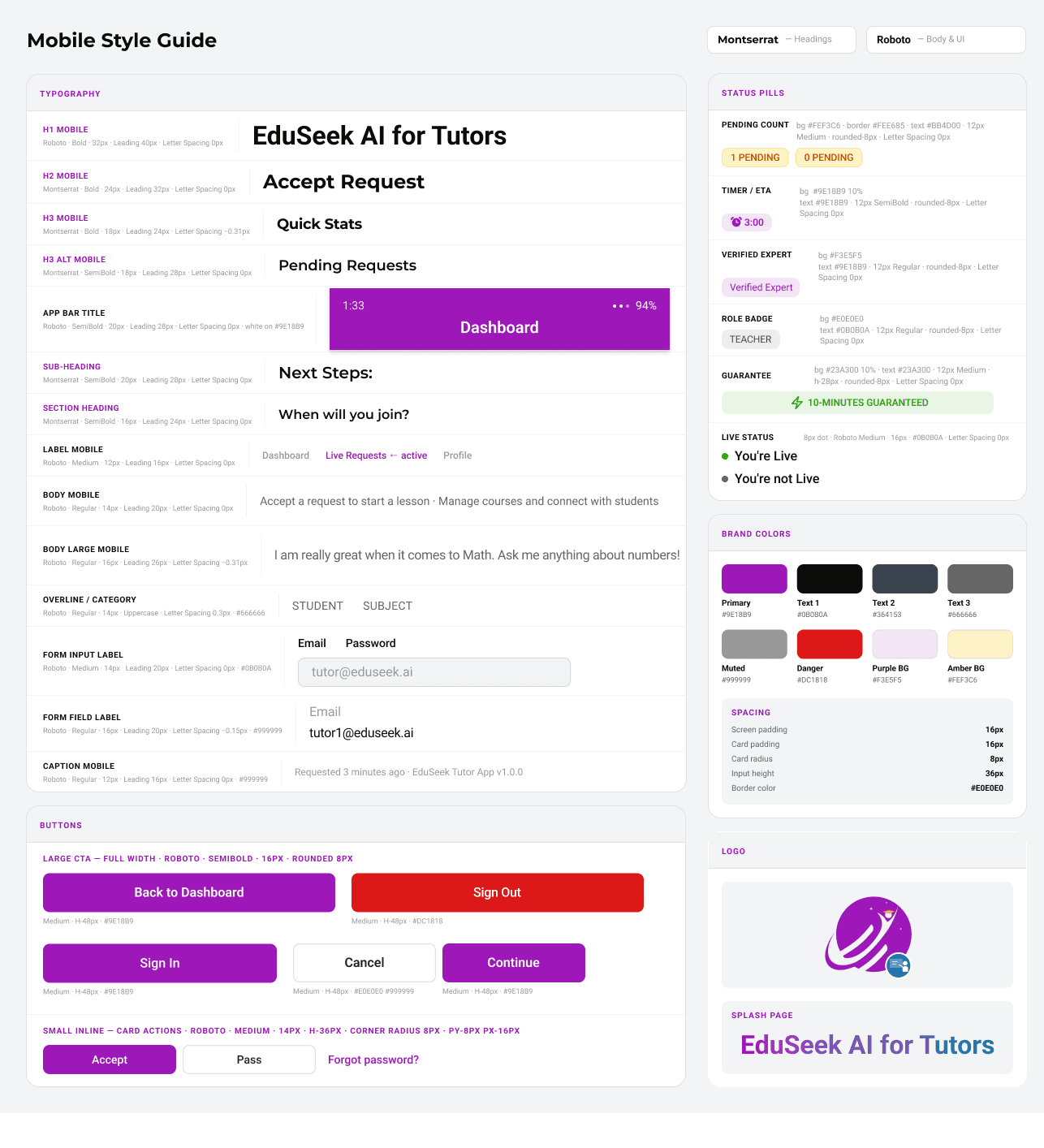
Design System and Branding
Solutions
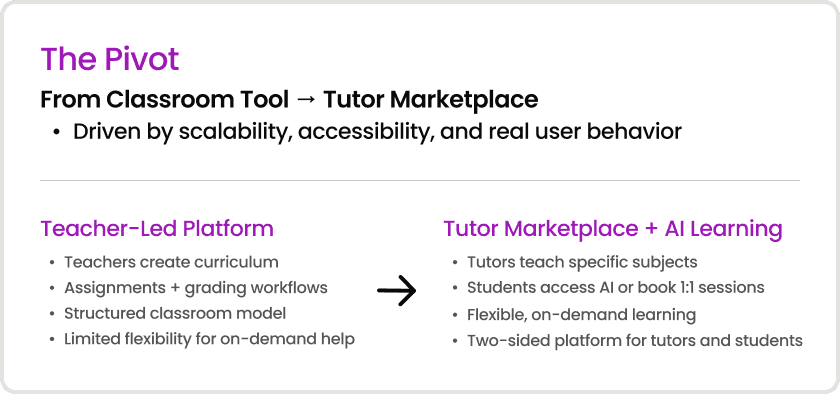
1. Shifted from static curriculum → on-demand learning
Designed for flexibility instead of rigid classroom structures
2. Introduced a two-sided tutor marketplace
Enabled direct connections between students and subject-specific tutors
3. Redesigned experiences around real user roles
Built tailored workflows for tutors, students, and parents
4. Connected AI guidance with human support
Created a system where AI assists learning, not replaces it
Solutions
1. Shifted from static curriculum → on-demand learning
Designed for flexibility instead of rigid classroom structures
2. Introduced a two-sided tutor marketplace
Enabled direct connections between students and subject-specific tutors
3. Redesigned experiences around real user roles
Built tailored workflows for tutors, students, and parents
4. Connected AI guidance with human support
Created a system where AI assists learning, not replaces it
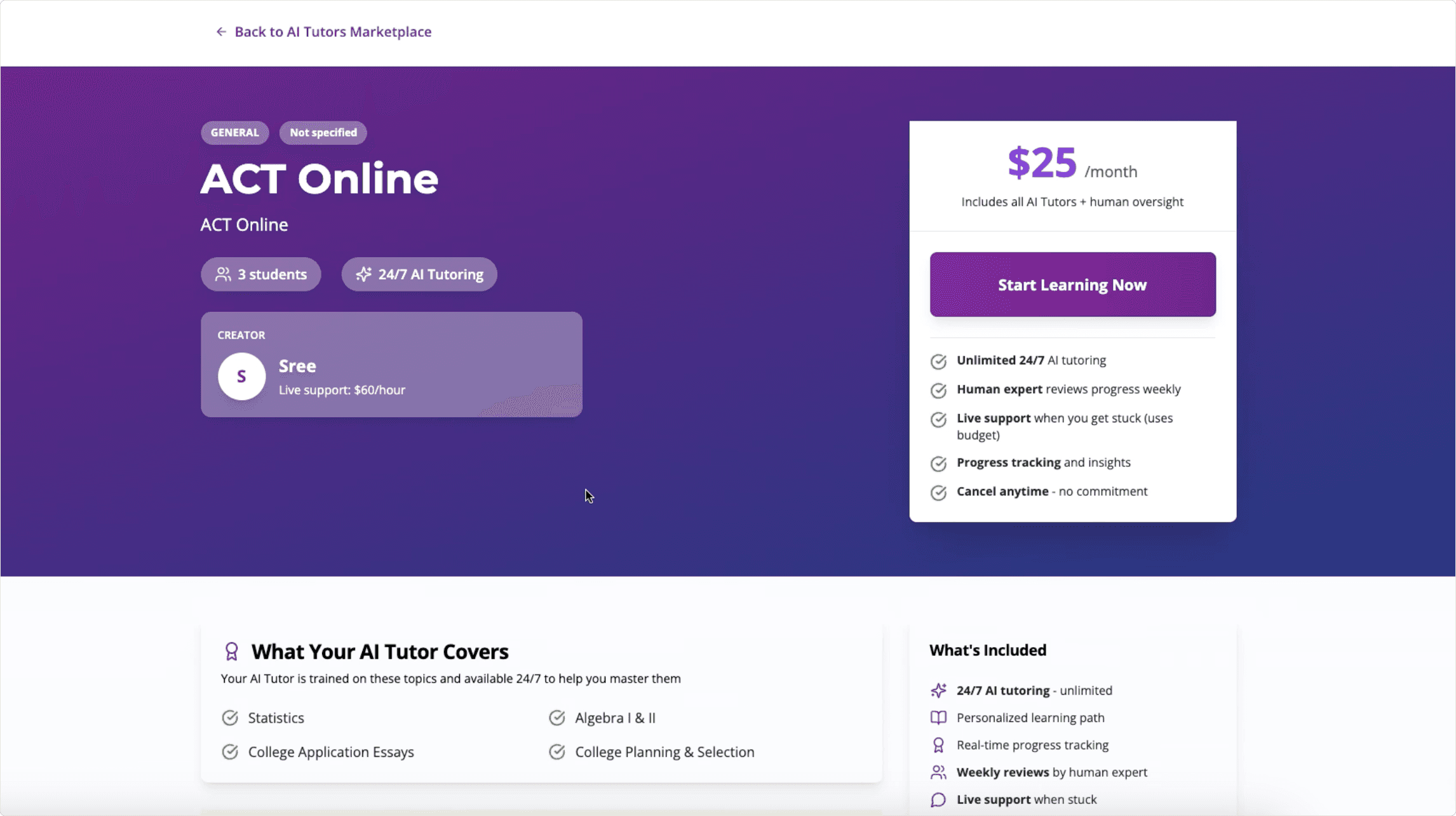
Market Tutor Profile Redesign
Improving visual hierarchy, credibility, and usability
Before
After
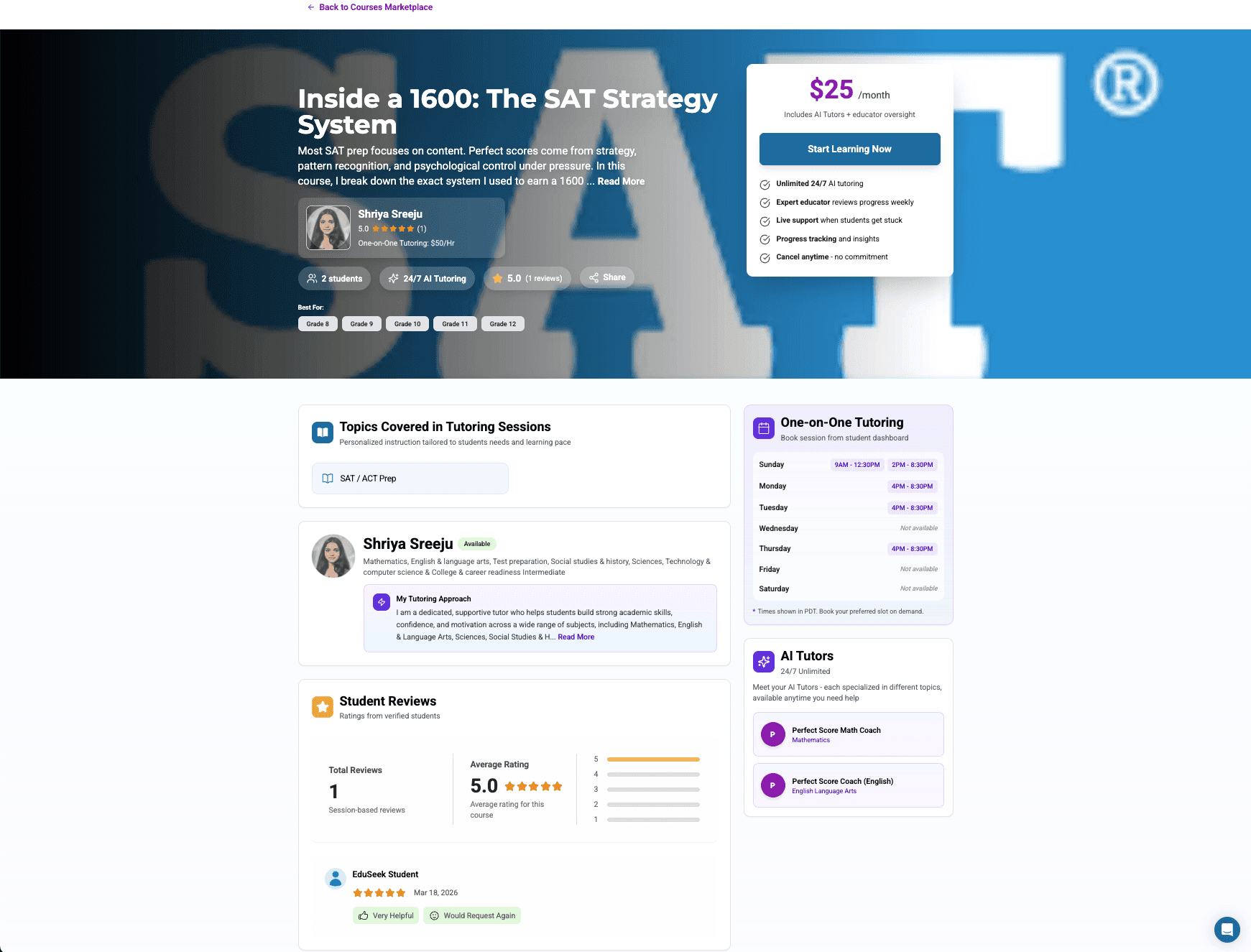
1. Enhanced Header
Added tutor photo, course description, and grade levels for better visual hierarchy
2. Credibility Features
Added tutoring approach section and student reviews for increased trust
3. Improved Scheduling
Simplified time slot display for easier session booking
Key User Experiences
Student Experience
Focused on creating a flexible and engaging learning experience for students
Enabled easy access to enrolled courses, discovery through the marketplace, and personalized recommendations
Introduced session recordings so students can revisit material at their own pace and support different learning styles
Integrated an EdCoin system to reward engagement and encourage continued learning
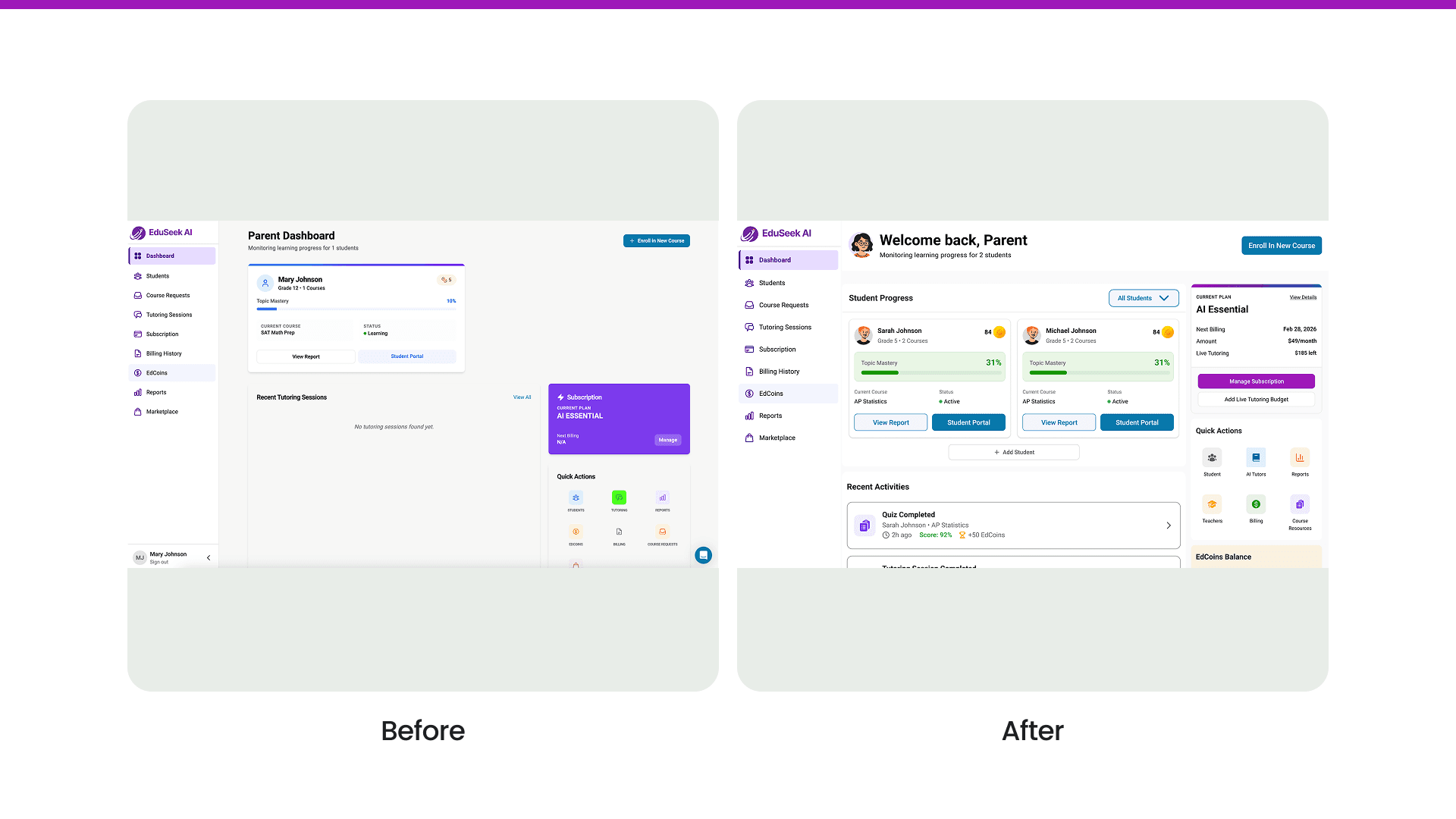
Parent Experience
AI Tutor Chat
Helped shape an AI tutor that guides students step-by-step instead of just giving answers, making the experience feel more supportive.
Designed a support system where students can move from AI guidance to a live tutor through an SOS feature when they need extra help
Pushed for more contextual support by suggesting an attachment feature, so students can upload their work and get feedback based on what they’re actually stuck on
Mobile Accessibility
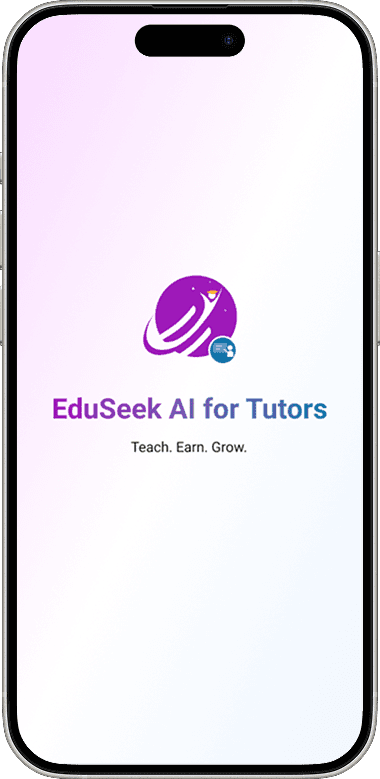
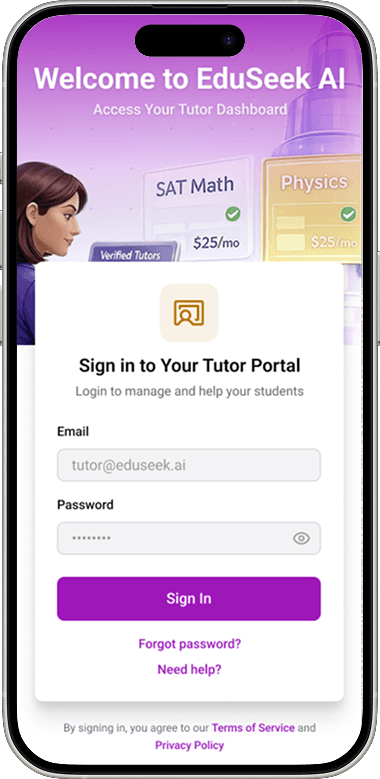
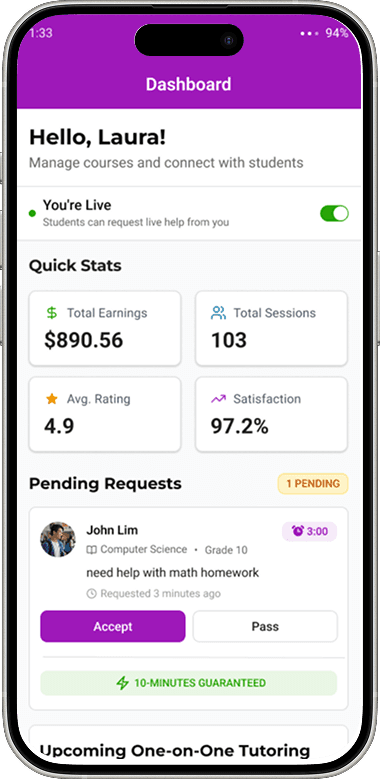
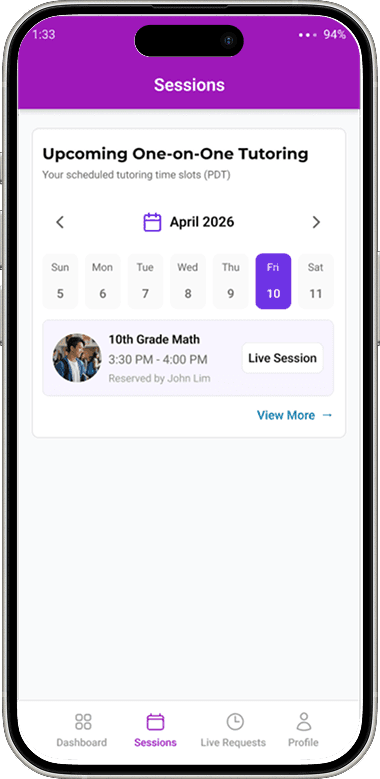
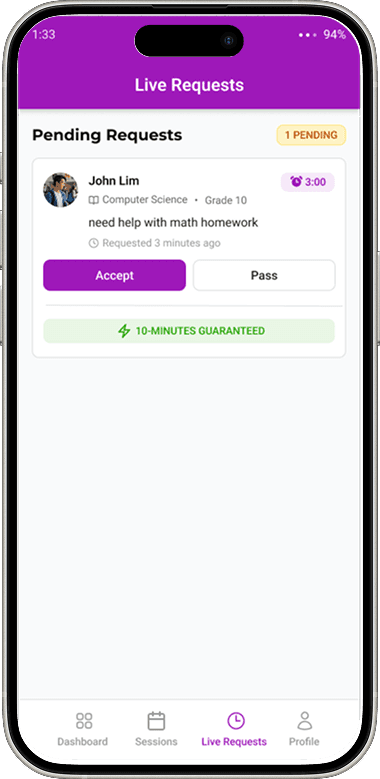
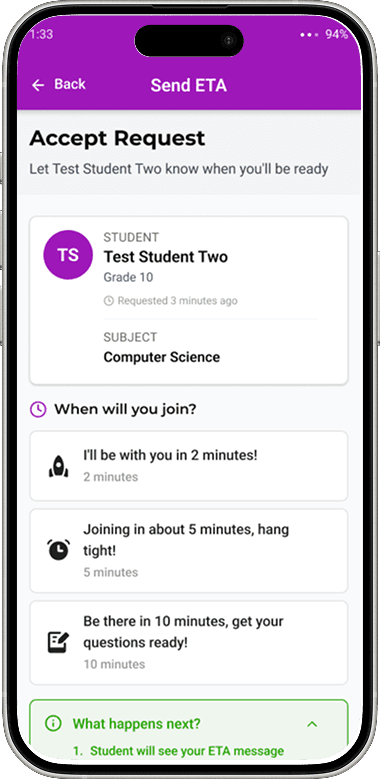
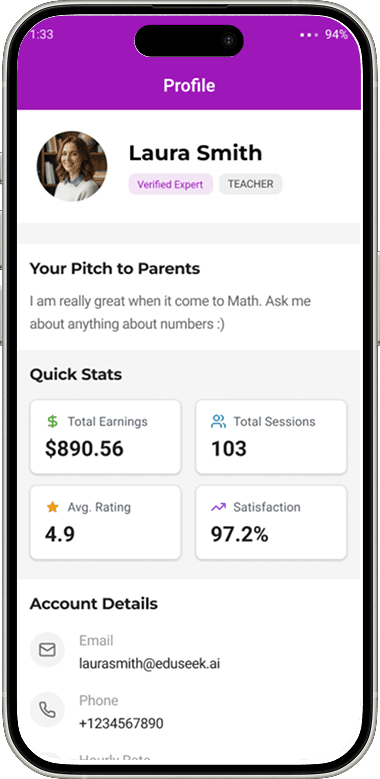
Designed a mobile experience that enables tutors to stay connected and responsive on-the-go to provide quick access to account management, performance insights, and real-time session readiness.
Website
Key Takeaways & Next Steps
1
User-Centered Design
Design decisions were guided by usability testing and real user needs, ensuring workflows supported both sides of the platform, from students seeking help to tutors managing sessions and earnings.
Key insight
2
Cross-Functional Collaboration
Collaborated within a team of product designers, founders, and engineers to align on product direction, iterate quickly, and support a successful shift toward a tutor marketplace model.
Key insight
3
Systems Thinking Across B2B + B2C
Designed for a multi-sided platform by balancing the needs of tutors (B2B) with students and parents (B2C), creating a more cohesive and scalable learning experience.
Key insight
4
Scalable & Iterative Design
Focused on building consistent UI patterns and adaptable experiences that support ongoing product growth across dashboards, mobile apps, and AI-driven features.
Key insight
User Interviews
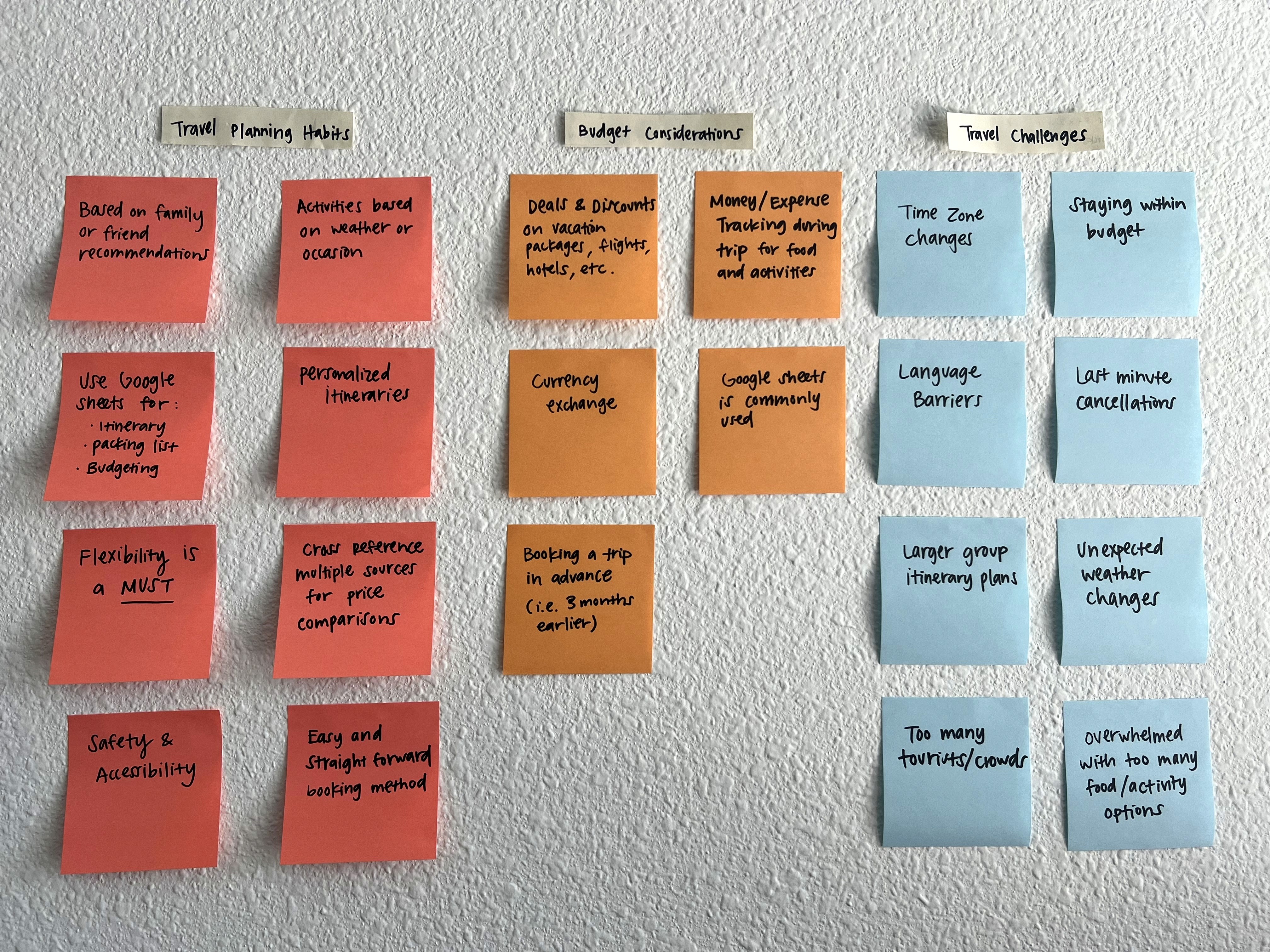
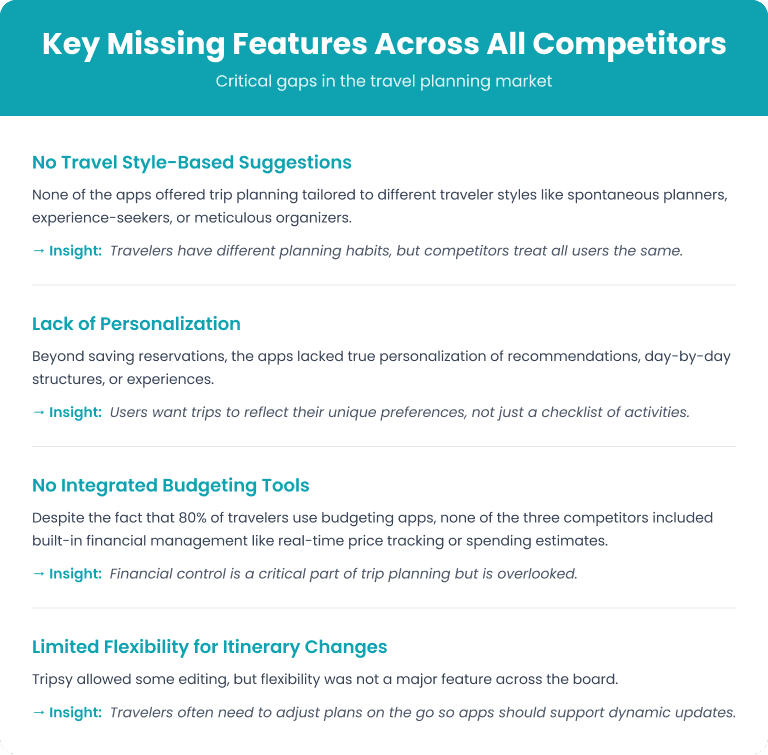
As a travel enthusiast, I often find myself planning last-minute group trips with friends. While we always managed to pull the itinerary together by adding activities on the go, the process was hectic and unorganized.
However, I’ve also noticed that although we sacrifice time and energy to plan, we often end up with disorganized itineraries, overlooked details, and choices that don’t always align with everyone’s preferences or budget.
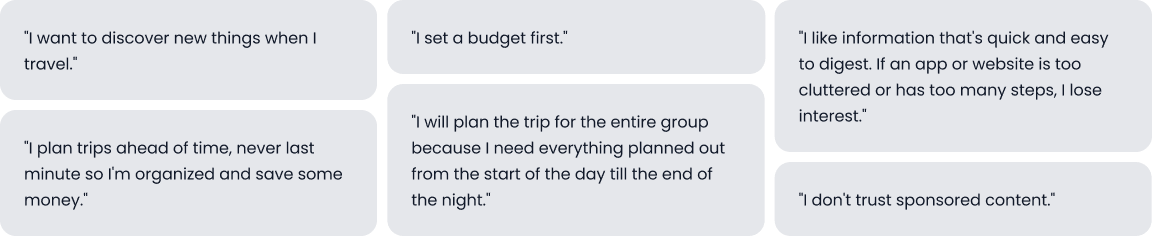
User Quotes
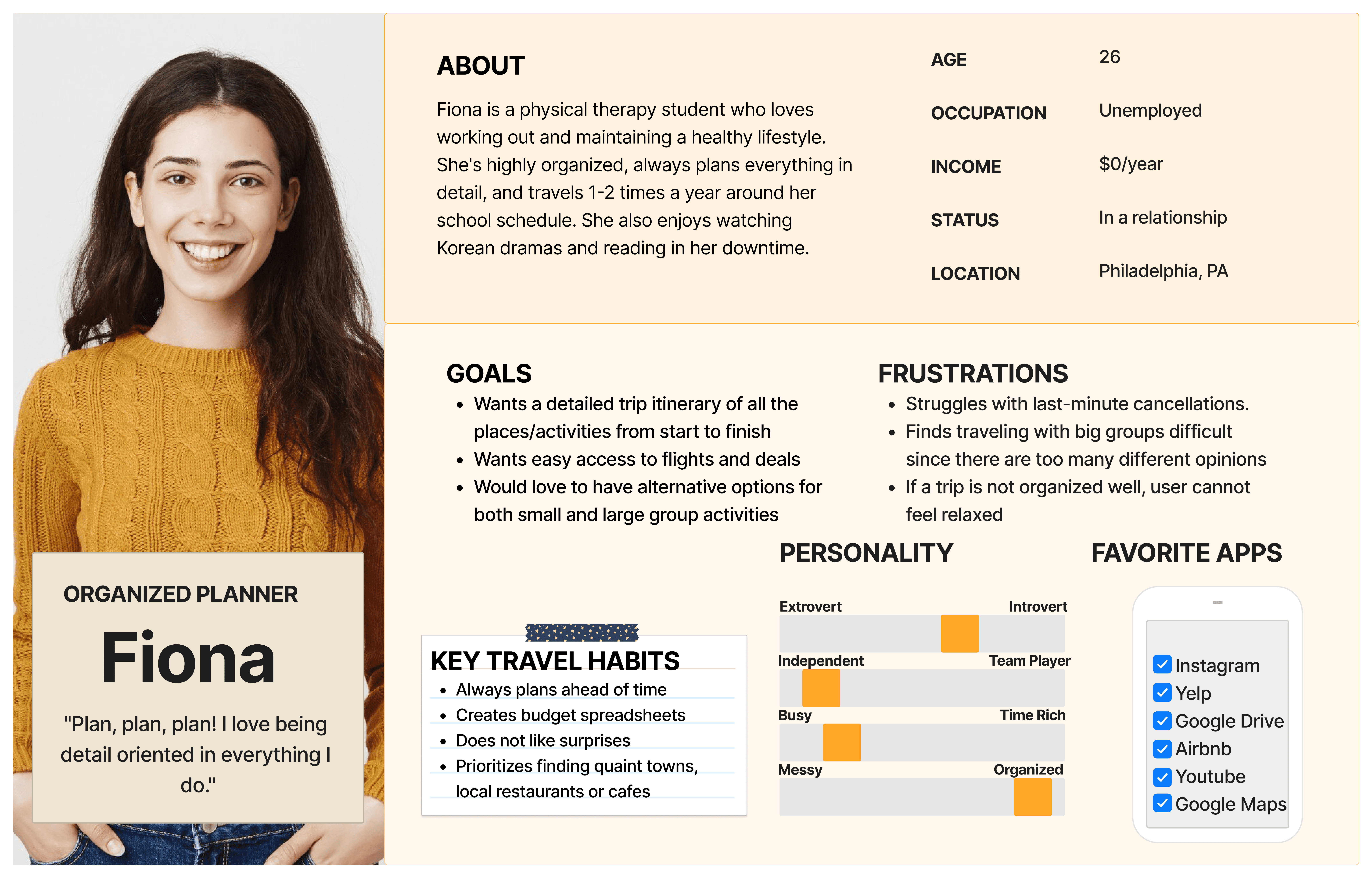
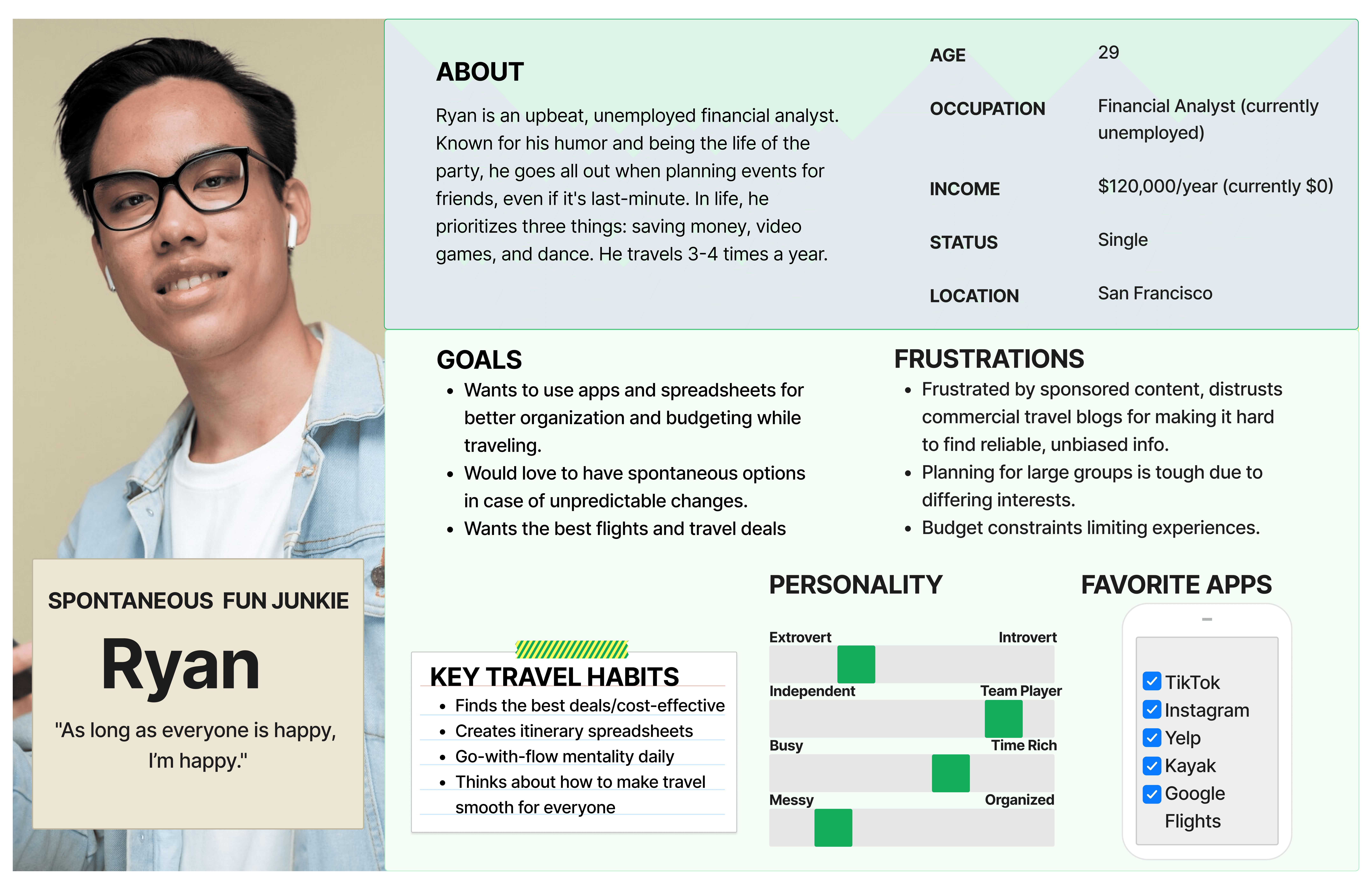
Main User Personas
In the early stages, I interviewed several types of travelers: spontaneous explorers, deal-hunters, and experience seekers. I realized their struggles weren’t based on age or location alone. It was all about their travel style.
People like Ryan travel based on how they’re feeling, and they don’t want strict plans.
Others like Fiona thrive on details. She wants structure, tracking tools, and clarity.
Some users are somewhere in the middle who plan loosely but still want to feel in control.
HOW MIGHT WE…
Simplify the travel planning process to reduce decision fatigue while offering personalized, budget-friendly options that adapt to different travel styles, from spontaneous explorers to meticulous planners?
Early Ideation
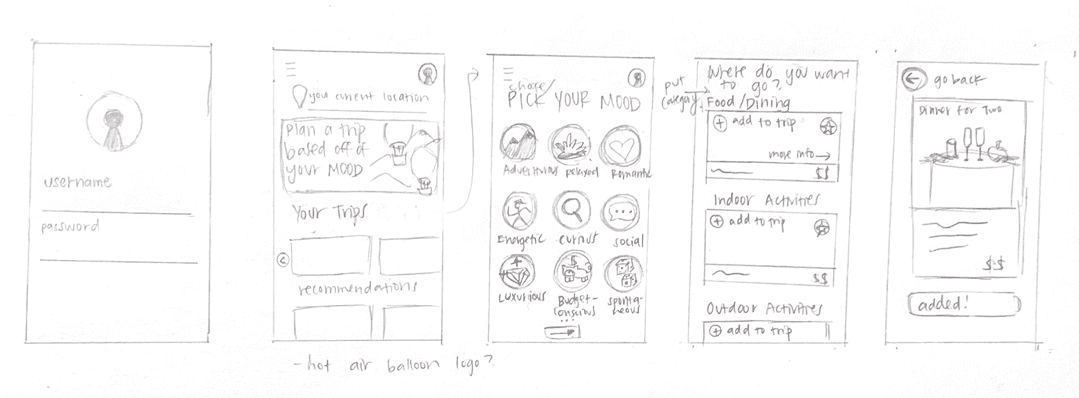
My first idea was a mood-based trip planner. The app would ask you how you're feeling and suggest a trip that matches that mood. It sounded playful and different, and users were intrigued at first.
But in testing, frequent comments included:
‘I don’t really know what “cozy” means in terms of activities.”
“I want to feel adventurous, but what if I just want a good meal?”
So the idea had charm, but it lacked clarity. Users couldn’t see how their mood would realistically guide a full trip plan. Ultimately, that disconnect led to my biggest pivot!
Sketch
User Flow
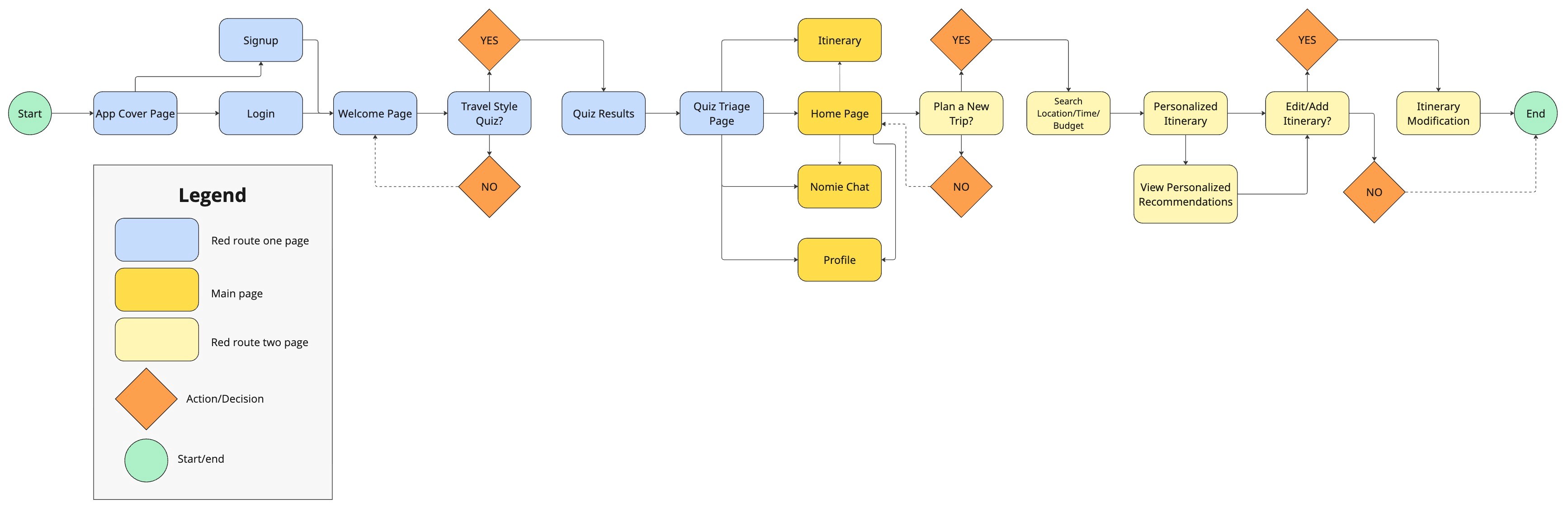
This user flow shows how the app guides travelers from the first tap to a fully personalized trip:
It starts with a simple entry point, the App Cover Page, where users can log in or sign up.
From there, they land on a Welcome Page and take a Travel Style Quiz that helps the app understand their preferences, like how they like to travel and what kind of budget they’re working with.
After getting their results, they’re brought to the Quiz Triage Page, which acts as a jumping-off point to explore different parts of the app.
From this hub, users can head to the Home Page where they can view their itinerary, chat with the Nomie assistant for help, or update their profile. They can make changes, add details, and then view tailored suggestions for places to stay, eat, and explore based on their quiz results and budget.
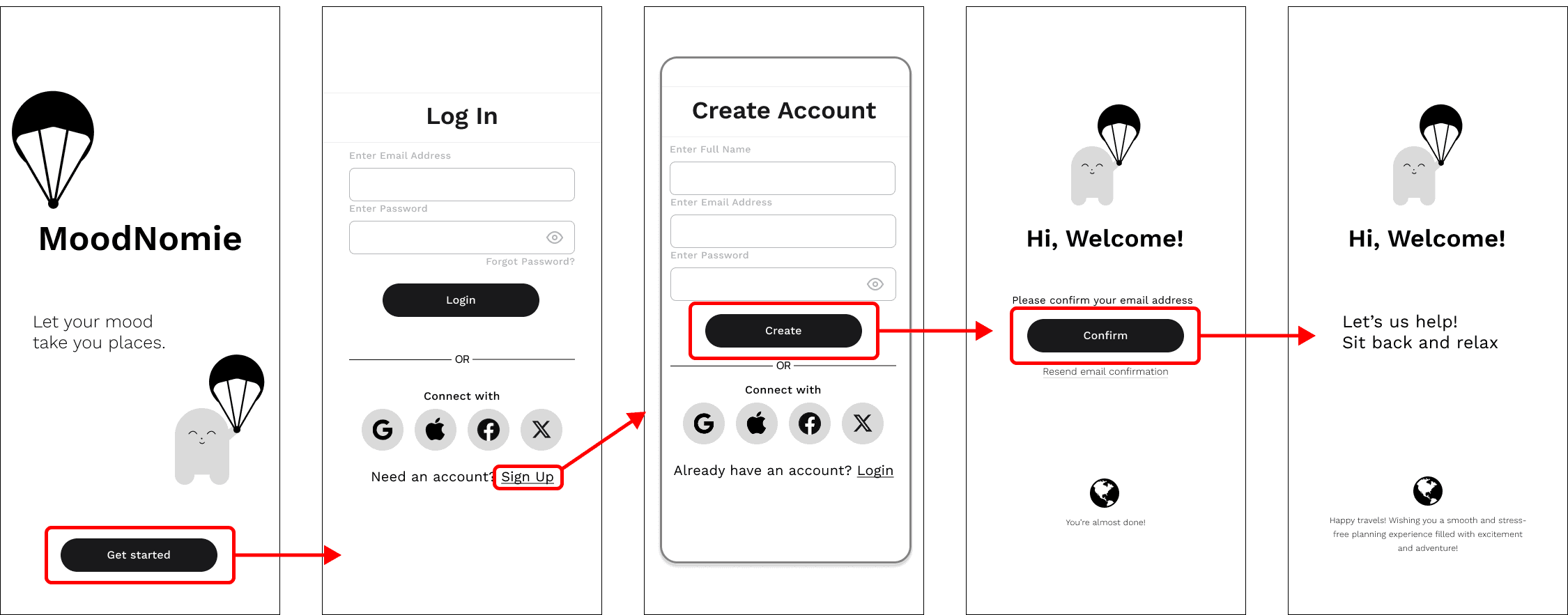
Wireframes
Red Route One - Create An Account
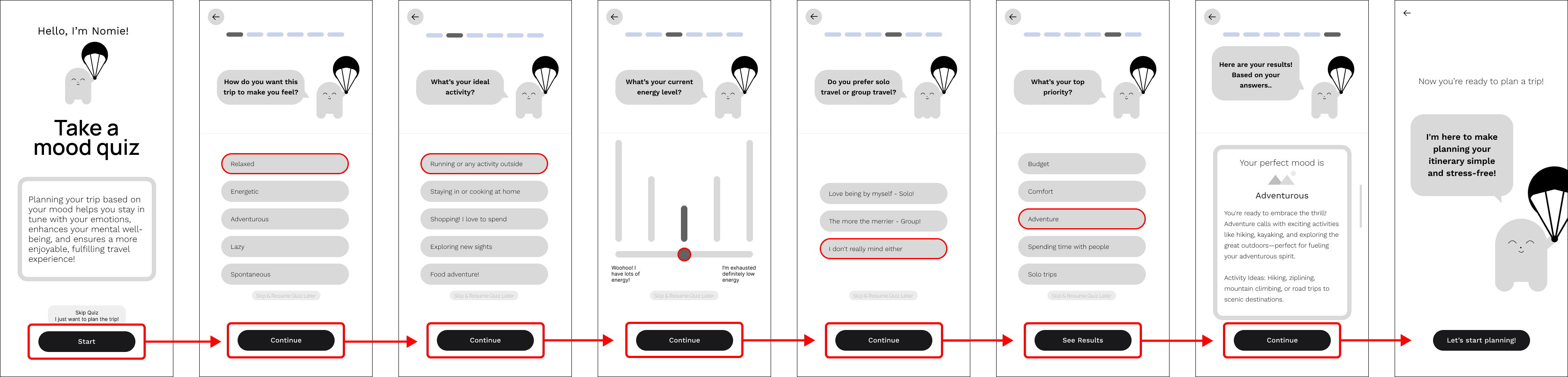
Red Route Two - Onboarding: Mood Quiz
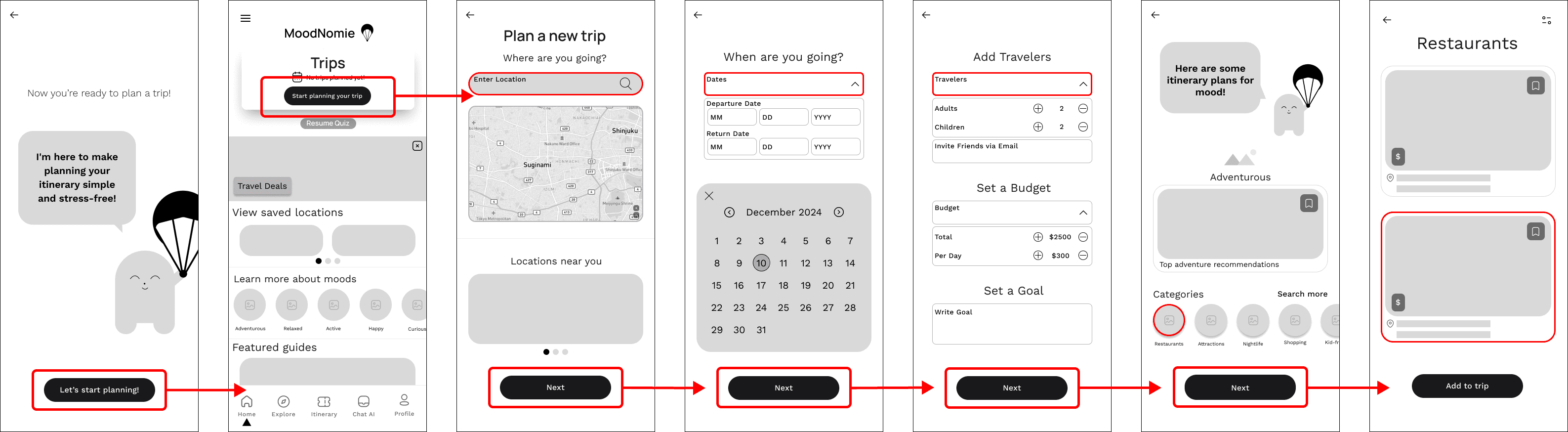
Red Route Three - Plan a Trip
High Fidelity Screens
Sign In and Sign Up
Red Route One - Create Running Plan
These result pages offer a clean, personalized experience aligned with each user's goals, schedule, and fitness level. Core details like weekly mileage, progress tracking, and run types are clearly displayed to keep users focused and motivated.
Red Route Two - Use Previous Running Plan
Editing supports real-life flexibility: users can adjust specific runs, change weekly targets, or update their timeline. The interface is modular and intuitive, making edits feel manageable without starting over. This route encourages consistency and long-term engagement, even when routines shift.
Red Route Three - AI Chat
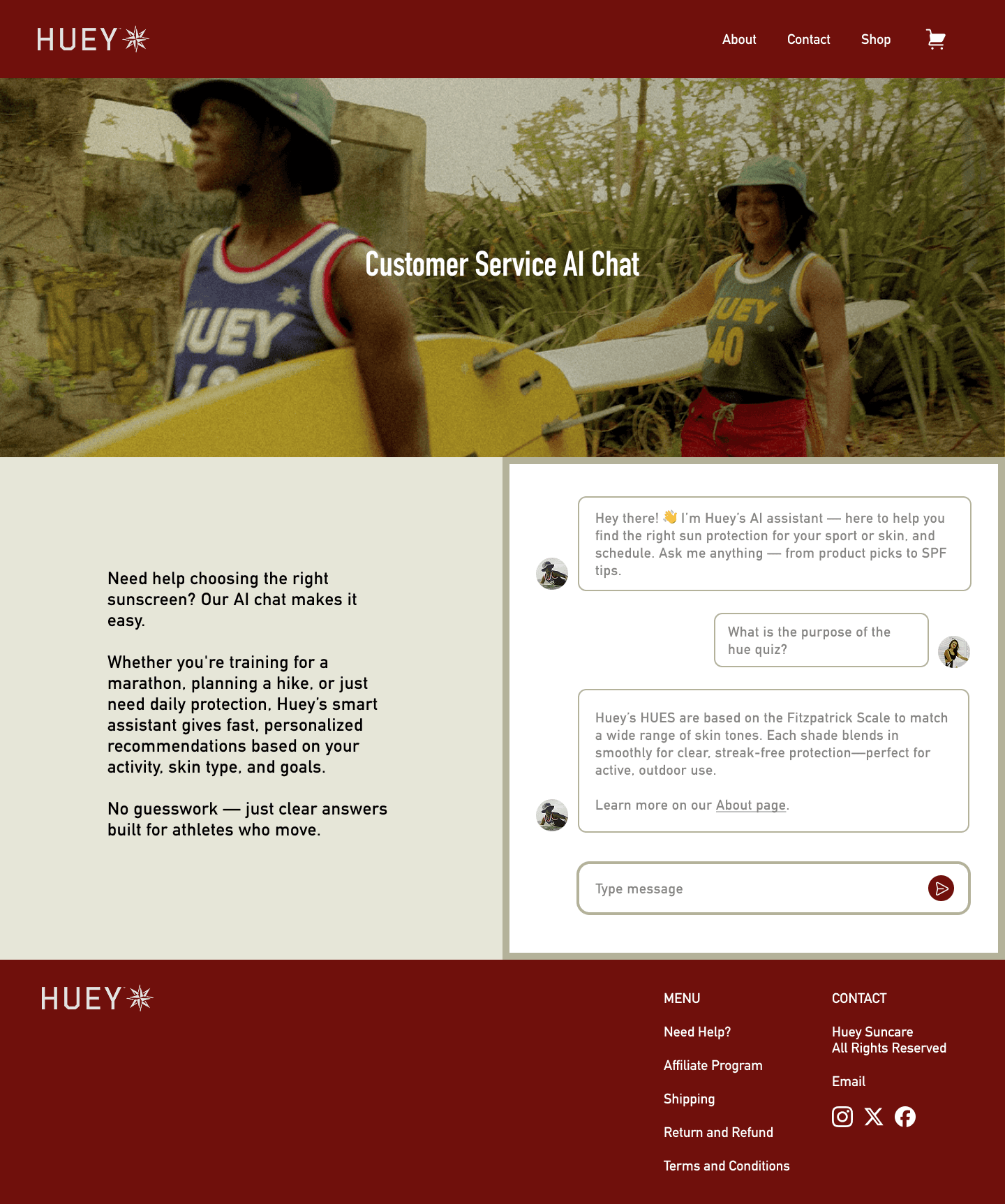
The AI chat feature acts as an on-demand running coach, offering guidance, answering questions, and suggesting adjustments based on user activity. It was designed to feel approachable and responsive, giving users a sense of real-time support.
Red Route Three - AI Chat
The AI chat feature acts as an on-demand running coach, offering guidance, answering questions, and suggesting adjustments based on user activity. It was designed to feel approachable and responsive, giving users a sense of real-time support.
Design System
Design System
Design System
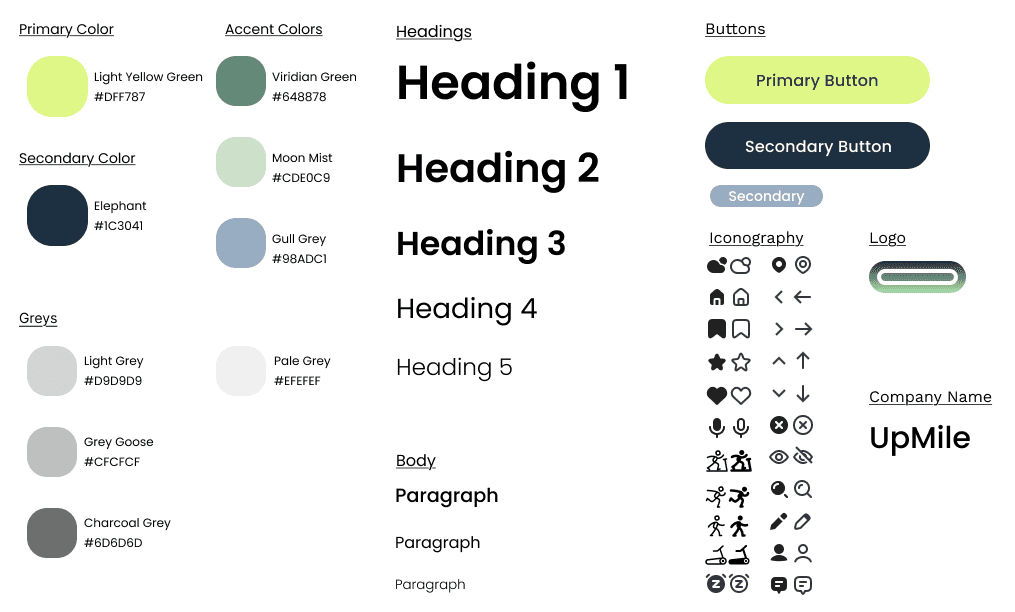
I chose a green color palette for the app because it naturally evokes feelings of growth, energy, and balance, which are qualities that align well with running and fitness.
Green is often associated with nature and the outdoors, which complements the app’s focus on both indoor and outdoor running options. From a psychological perspective, green promotes calmness and motivation without overwhelming the user, helping maintain focus during training.
*According to Cleveland Clinic Newsroom - Why Many Enjoy the Color Green
Design System
I chose a green color palette for the app because it naturally evokes feelings of growth, energy, and balance, which are qualities that align well with running and fitness.
Green is often associated with nature and the outdoors, which complements the app’s focus on both indoor and outdoor running options. From a psychological perspective, green promotes calmness and motivation without overwhelming the user, helping maintain focus during training.
*According to Cleveland Clinic Newsroom - Why Many Enjoy the Color Green
Red Route Three - Plan a Trip
Solutions
1. Shifted from static curriculum → on-demand learning
Designed for flexibility instead of rigid classroom structures
2. Introduced a two-sided tutor marketplace
Enabled direct connections between students and subject-specific tutors
3. Redesigned experiences around real user roles
Built tailored workflows for tutors, students, and parents
4. Connected AI guidance with human support
Created a system where AI assists learning, not replaces it
Design System and Branding
Before
Before
After
1. Enhanced Header
Added tutor photo, course description, and grade levels for better visual hierarchy
2. Credibility Features
Added tutoring approach section and student reviews for increased trust
3. Improved Scheduling
Simplified time slot display for easier session booking
1. Enhanced Header
Added tutor photo, course description, and grade levels for better visual hierarchy
2. Credibility Features
Added tutoring approach section and student reviews for increased trust
3. Improved Scheduling
Simplified time slot display for easier session booking
Wrap-up
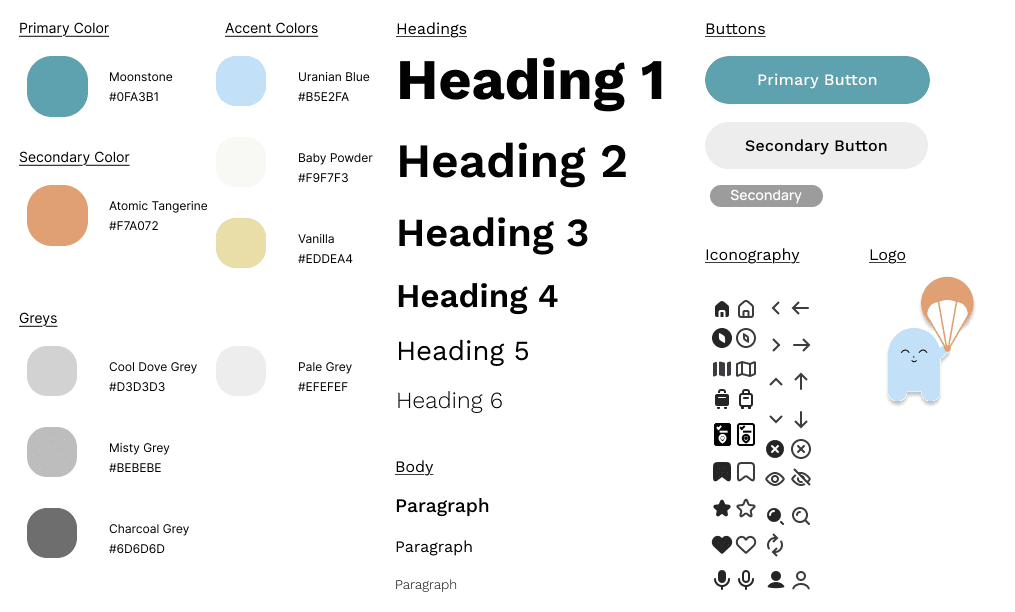
This project was a defining moment for me as a designer. Partnering with three designers and a stakeholder at Huey Suncare, I balanced brand vision, speed, and user needs in a fast-paced environment. Through targeted research and A/B testing, I validated that color and visual identity were critical to communicating energy and trust.
If given more time, I would expand testing to strengthen pattern recognition and increase confidence in design decisions. Ultimately, this project reinforced my belief that thoughtful, research-backed design transforms products into meaningful brand experiences.
The Impact: Bridging the Confidence Gap
Through iterative testing and an empathy lens, I transformed Upmile from a tracking utility into a comprehensive support system. By focusing on the psychological barriers to entry, I solved three core pain points:
From Data-Shaming to Micro-Wins:
I replaced performance-heavy metrics with psychological reinforcement. Celebrating "micro-milestones" shifted the focus from distance to habit formation.
Reducing Cognitive Overload:
I restructured the information architecture into a modular navigation system. By categorizing gear and prep into "just-in-time" modules, users felt prepared without feeling overwhelmed.
The "Coach" Experience:
I evolved a standard chatbot into an Empathy-Driven AI Assistant. By utilizing contextual prompts based on user progress, the app moved from a "tool" to a "partner," increasing user confidence during onboarding.
Future Scoping & Strategy
To further evolve Upmile, my next steps would focus on the long-term emotional journey
of a runner:
→
Emotional Mapping: I would map the specific "drop-off points" (e.g., the 3-week slump) to align motivational messaging and pacing even more precisely with the user's headspace.
→
Non-Competitive Community: I'd explore small-group accountability tools that prioritize shared goals over leaderboards, catering to the beginner's need for safety rather than competition.
More insights to explore
Discover additional case studies, tips, and strategies to help your business grow and innovate faster.
2025
Huey Suncare: Redesigning the Suncare E-commerce Experience
A modernized e-commerce platform that integrates interactive quizzes and an AI-powered dermatology chat to improve accessibility for diverse skin needs.
2024
Nomie: Where Personalized Travel Style Meets Financial Clarity
Nomie is an AI-powered budgeting tool that translates individual spending habits into personalized itineraries to help travelers plan actionable and stress-free trips.
Get In Touch
I would love to hear from you! Reach out with any questions or feedback
Ireland M.
Let's Talk
Interested in discussing design, sharing ideas, or exploring innovations in product design? Feel free to reach out - let’s keep the conversation going.
Let's have a coffee chat!
Get In Touch
I would love to hear from you! Reach out with any questions or feedback
Ireland M.
Let's Talk
Interested in discussing design, sharing ideas, or exploring innovations in product design? Feel free to reach out - let’s keep the conversation going.
Let's have a coffee chat!